
Your LinkedIn profile is working for you or against you right now. This guide covers what to fix and in what order to meaningfully improve it, with a focus on the things that affect search visibility, profile views, and whether the right people decide to reach out.
Why LinkedIn Profile Optimization Matters
LinkedIn now has over 875 million members. At that scale, the gap between an optimized profile and a neglected one is visible: better search placement, more inbound contact requests, and a credibility advantage that makes every outbound message land better. A well-built profile does work for you passively, but only if you've actually built it.
- Better search placement means you surface when the right people are looking
- An optimized profile converts passive viewers into active connections and inbound requests
- Recruiters and buyers form impressions before you've said a word; your profile frames that impression
- Every message you send outbound is backed by your profile (a weak one undercuts a good pitch)
- Consistent visibility compounds into personal brand recognition in your field
- For sellers and founders: profile credibility reduces friction throughout the entire sales process
LinkedIn SEO: Making Your Profile More Discoverable
The techniques below are organized around the highest-impact levers: the ones that affect both how LinkedIn indexes your profile and how visitors assess you when they land on it.
1. Choose the Keywords You Want to Rank For
LinkedIn search works like any other search engine: the terms in your profile determine when you show up. Start by deciding what you actually want to rank for. If you're building a client pipeline, think about what your ideal client types in when they're looking for someone with your skills. Those terms belong in your headline, About section, job titles, and skills list.
If you're a salesperson or freelancer, think in terms of what your prospects search for, not the internal job title your employer invented. Hashtags can reinforce topical association too.
Here's a real example of what deliberate keyword placement looks like in practice:
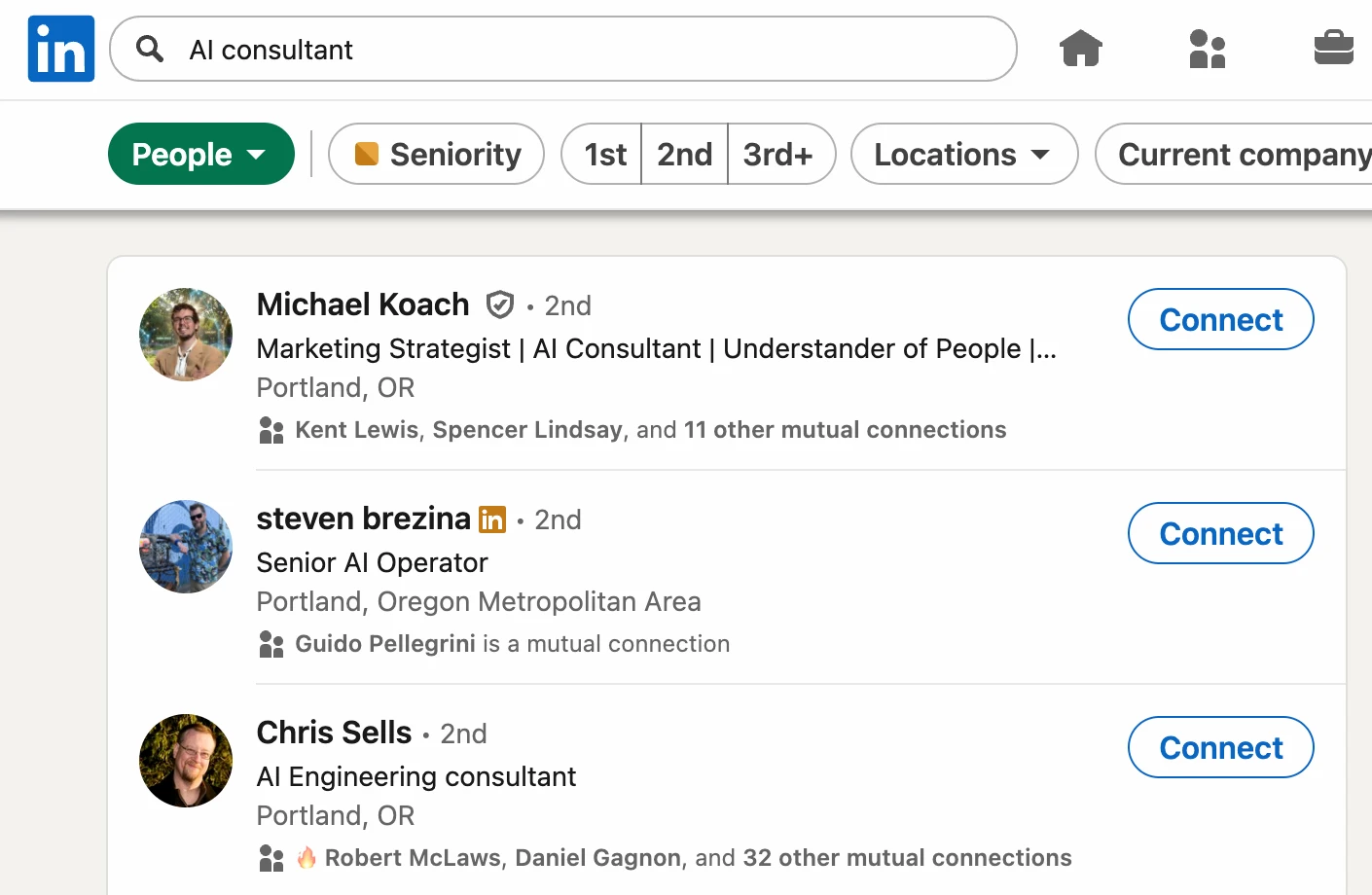
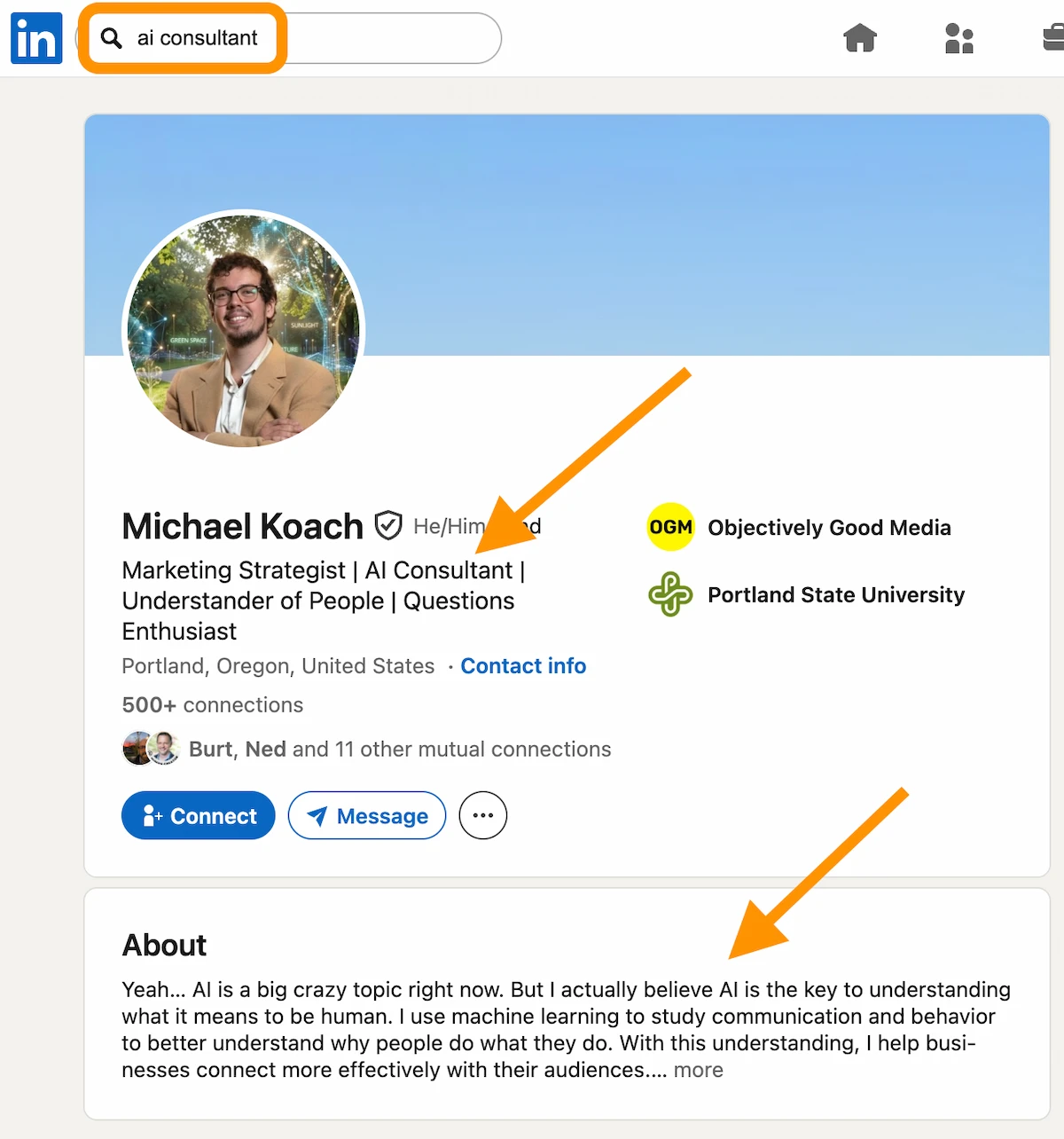
Finding the right keywords doesn't require a tool. Ask yourself: what would I search if I were looking for someone with my exact skills? Beyond that:
- Talk to existing clients about how they describe their problems in their own words
- Run searches in LinkedIn itself to see which profiles surface for relevant terms
- Use keyword research tools to identify related terms with real search volume
Think of your profile as a keyword document: every section is an opportunity to reinforce the terms you want to rank for, starting with the most prominent fields and working down.
Distribute keywords naturally across your headline, About section, experience entries, and skills. Using them awkwardly or stuffing them in just for SEO reads badly to real people, and LinkedIn's search algorithm has been getting more sophisticated over time. Profiles that read well tend to rank well sustainably.
Your profile matters more than it used to, algorithmically. LinkedIn's 2026 feed overhaul (360Brew) replaced network-based ranking with an LLM-based retrieval model that selects candidate posts based on semantic and professional relevance. That model reads your profile text directly to build its understanding of what topics you're associated with. For accounts with little engagement history, profile text quality is the primary signal the retrieval model has to work with. A keyword-rich, clearly written profile now influences not just who finds you in search, but whether your posts get surfaced to relevant audiences at all. The data on how dramatically feed composition has shifted makes this worth taking seriously.
2. Write a Headline That Works Hard
Your headline is the highest-traffic field on your profile. It appears in search results, next to comments you leave, and on every connection request you send. You have 220 characters; use them to communicate what you do and who you do it for with enough specificity that the right person immediately knows you're relevant.
Here's a strong example:
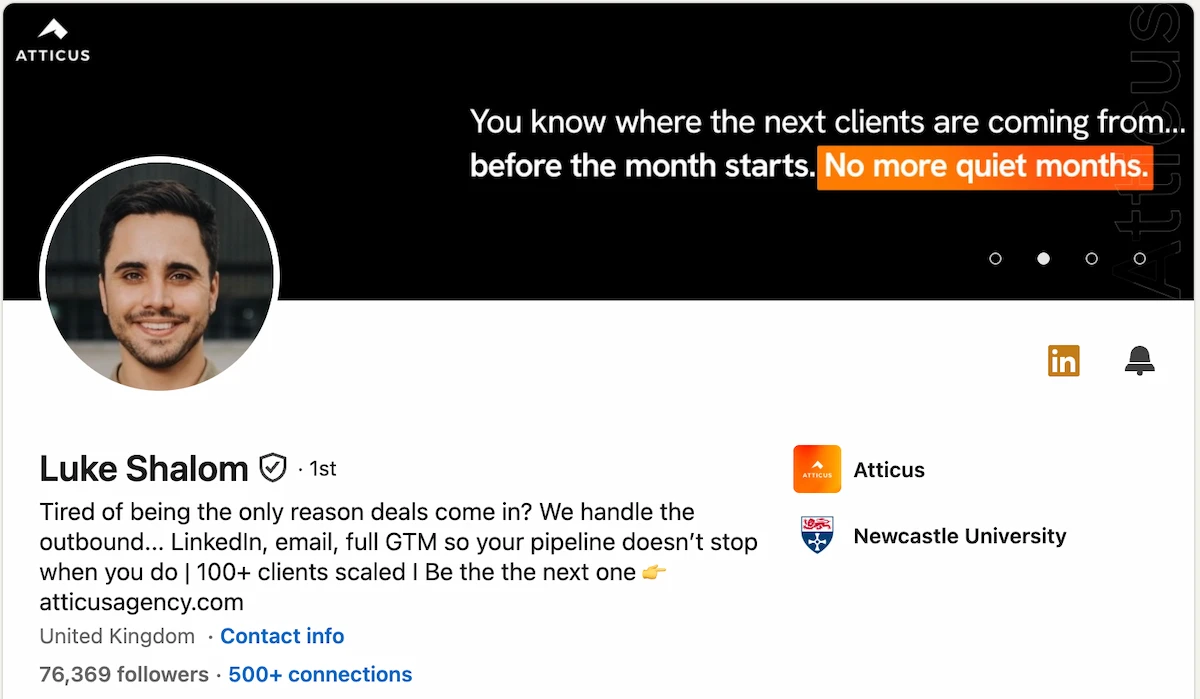
One pattern to avoid: over-qualifying your target audience in the headline itself ("I help Series B SaaS founders with 50+ employees who want to..."). Specificity is good; turning your headline into a qualification filter is awkward, and it reads as a pitch before there's any relationship. Specificity should come from clarity about what you do, not from stacking modifiers.
The simplest headlines tend to work best: your role, your organization or focus area, and the core value you deliver. When someone sees you in search or in their feed, that's all the context they have. Make it count.
Want more examples? Check out our guide to outstanding LinkedIn headline examples.
3. Build an About Section That Converts
A well-structured About section answers four questions in order:
- Who are you and what's your background?
- What problem do you solve, and for whom?
- What evidence do you have that you can actually solve it?
- What's the next step you want them to take? Phone, email, booking link: if you're in sales, make the next move obvious.
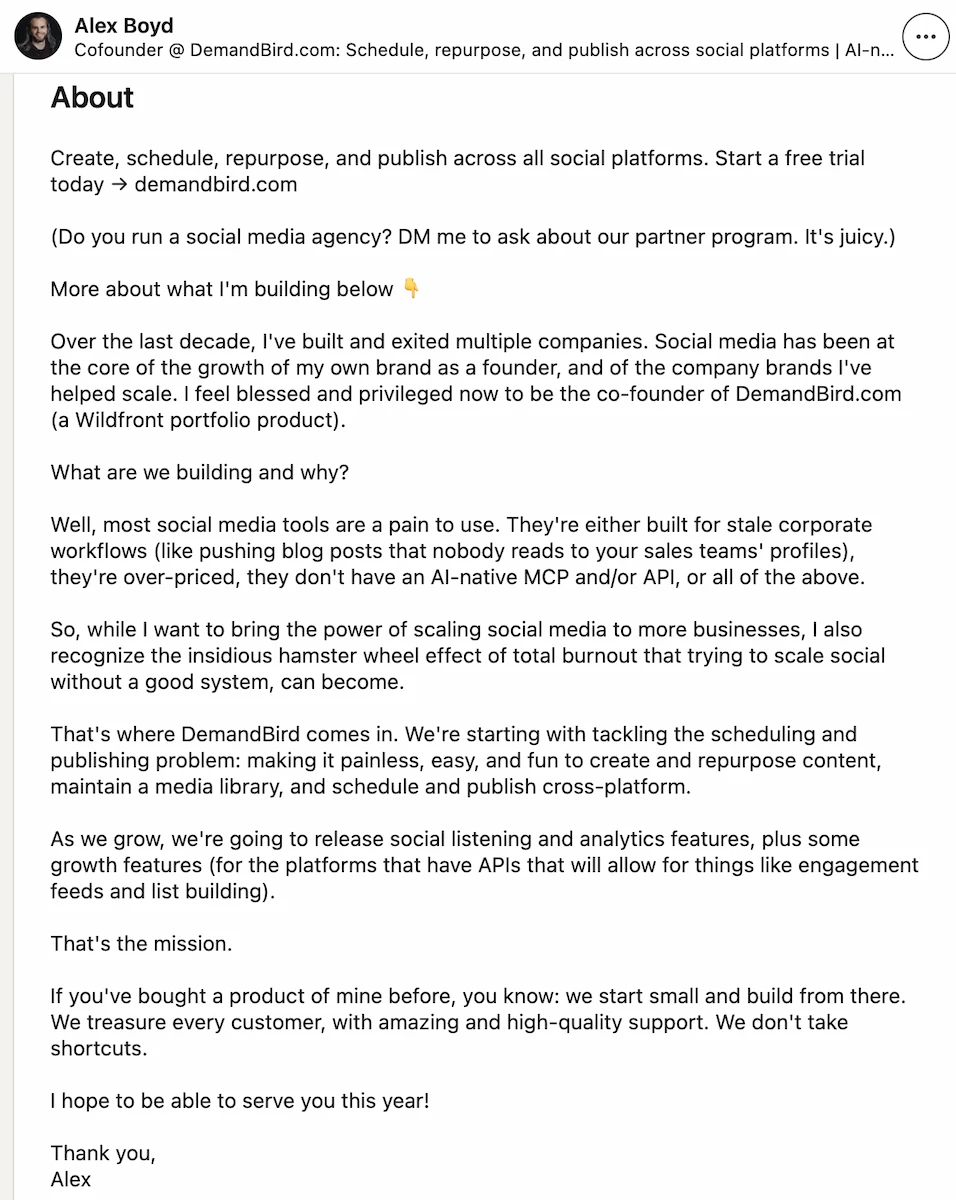
What separates a good About section from a forgettable one:
- It's scannable, not dense: short paragraphs or a mix of prose and bullets
- It shows outcomes, not just tasks; results are more convincing than descriptions of responsibilities
- Personal detail makes it human: readers respond to a sense that there's a real person behind the profile
- It ends with one specific action the reader can take, not an open-ended "feel free to reach out"
If you want a deeper breakdown focused specifically on the About section, including what to put in the first lines, when to place your website high up, and how to make the section convert, read my full guide to writing a LinkedIn summary.
4. Use Content to Expand Your Reach
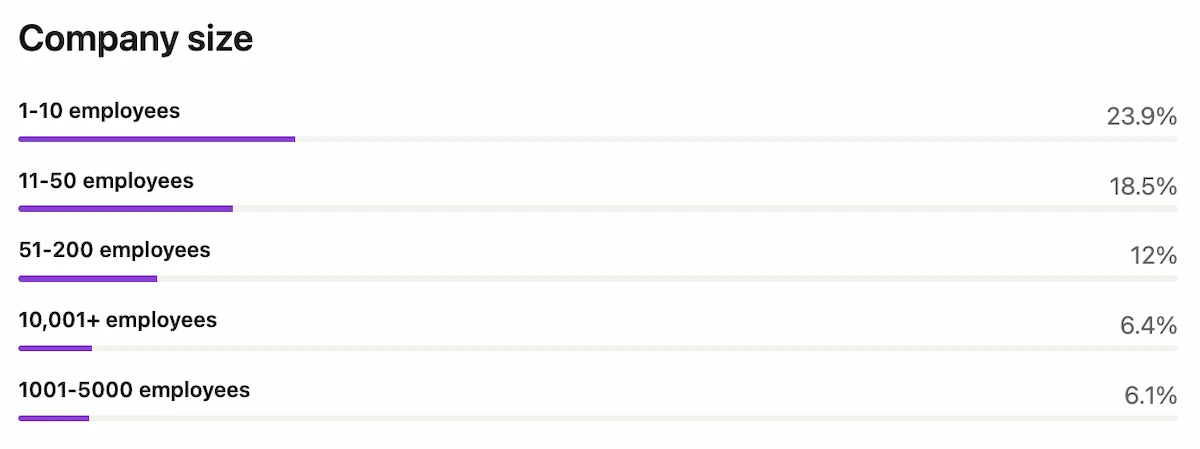
Content doesn't change your profile directly, but it dramatically increases the chances the right people find it. Posting regularly keeps you visible to your existing network and surfaces your profile to people who haven't connected with you yet. Understanding which posts drive the most impressions, comments, and shares lets you double down on what's already resonating. Tracking your LinkedIn engagement rate over time is the clearest signal of whether your content strategy is working.
Use your audience data actively: look at which companies and roles engage with your posts, find relevant colleagues at those companies, and reach out with a specific reason for connecting. Personalized outreach backed by a strong profile converts at a much higher rate than cold connection requests. Combine consistent content with targeted networking and your LinkedIn presence starts generating pipeline rather than just existing.
See how your LinkedIn posts are performing
Grade any post for free: get a score on hook, structure, and engagement potential.
5. Treat Your Skills Section as Keyword Infrastructure
LinkedIn allows up to 50 skills (recently expanded), ordered by endorsement count. Treat this section as keyword infrastructure: the terms here contribute to search relevance, so front-load the skills you actually want to rank for. Ask specific colleagues who can genuinely vouch for particular skills to endorse them; generic blanket endorsement requests get ignored.
6. Collect Specific, Credible Recommendations
Detailed, specific recommendations from credible people carry disproportionate weight. The difference between a profile with five vague endorsements and one with three concrete recommendations from recognizable names is immediately visible to anyone who reads them. Reach out to people who worked closely with you and can describe what actually changed because of your contribution: a former boss, a client you retained, a peer who witnessed the outcome. Offer to write one for them first; most people reciprocate.
7. Turn Experience Entries into Proof Points
Treat each experience entry as a proof point, not a job description. For every role, focus on what changed because of your work: outcomes, metrics, projects delivered. A title and date range tells visitors nothing; a brief description of what you built or improved tells them everything relevant.
Specific examples are more convincing than general claims: "Led migration to a new data pipeline that cut reporting time by 60%" lands differently than "Improved processes." Use experience entries to reinforce the keywords and expertise you're positioning around.
8. Get Your Profile Photo Right
Your profile photo is processed in under a second and sets the frame for everything else. It shows up in search results, next to every comment you leave, and on every message you send. Get it right.
- Solo shot: no group photos, no cropped-out shoulders
- Face clearly visible and taking up most of the frame
- Clean, neutral background that doesn't compete
- Genuine expression: a real smile reads better than a neutral professional pose
- Good lighting: natural or soft indoor light, no harsh shadows
- Clothing that matches how you'd show up to a client meeting
- Sharp, high-resolution file: blurry photos signal neglect
- Use a real photo. LinkedIn's systems now detect AI-generated and synthetic headshots and flag them as negative trust signals. Beyond the algorithmic penalty, visitors notice too. A real photo is the baseline; an AI-generated one is a red flag.
For side-by-side examples of what strong profile photos (and full profiles) look like in practice, see our LinkedIn profile examples.
9. Use Your Banner as Positioning Real Estate
The banner is high-visibility real estate that most people leave as the LinkedIn default, a missed opportunity. It's processed in the same two seconds as your photo and headline, so it should reinforce your positioning rather than waste the space.
What works well in a LinkedIn banner:
- Your core offer or the specific problem you solve
- A specific client result or outcome that signals credibility
- Your tagline or mission, if it's genuinely distinctive
- A direct CTA (booking link, website URL, or a resource)
There are two reasonable approaches depending on where you are:
Simple: Canva. Start from one of Canva's LinkedIn banner templates (1584 × 396px). Pick a clean layout, drop in your headline, offer, and a link. Keep the text minimal and the background uncluttered. Takes under an hour and is genuinely good enough for most purposes. Update it whenever your positioning changes.
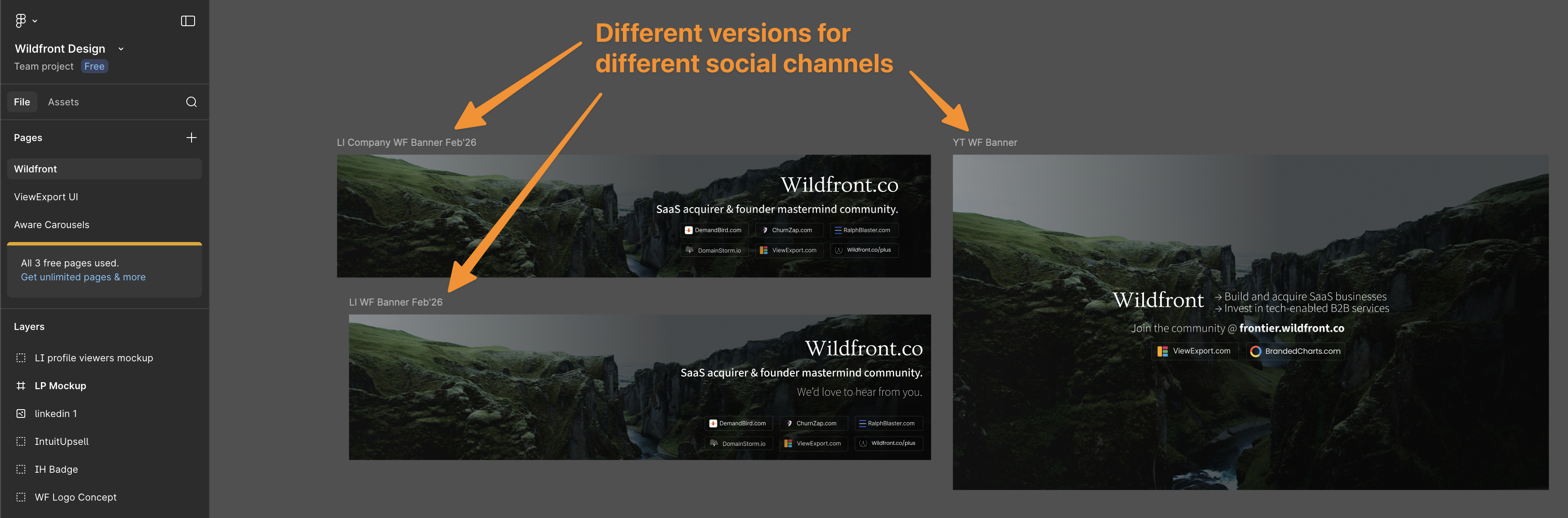
Upgraded: Figma + a professional designer. When you're investing more seriously in your brand presence, a designer working in Figma can produce a banner that's on-brand, visually distinctive, and matched across platforms. A good designer will version the same design for LinkedIn, YouTube, Twitter, and wherever else you show up, keeping the look consistent while adjusting dimensions and emphasis for each context.
10. Clean Up Your Profile URL
LinkedIn assigns a default URL that's a string of numbers and letters. Replace it with a clean version of your name (or name + profession). It looks more professional in email signatures and on resumes, takes about two minutes to change, and it's a permanent improvement. See our full guide to customizing your LinkedIn URL.
12. Optimize Your Featured Section
The Featured section is high-visibility real estate that a surprising number of people leave empty or fill with generic content. Use it intentionally: link to work that does a specific job for the visitor: proof, social proof, a lead magnet, or your best-performing post.
- Feature content that actively serves your positioning: a case study, a strong post, or a resource your target audience would want
- Vary the formats (article, post, external link, video) to show range without seeming scattered
- Revisit it quarterly: outdated featured content signals a stagnant profile
- Write a short description for each item that tells the visitor what to expect and why you chose to feature it
13. Use LinkedIn Features To Make Your Profile More Visible
LinkedIn quietly adds profile features that most people never activate. Two worth knowing about: the "Open to Work" photo frame (signals availability to recruiters passively, without requiring a public announcement), and the name pronunciation recording (useful for anyone whose name is commonly mispronounced).
The profile link field (just below your headline) is another often-ignored feature. It's one of the first elements a visitor sees and it points wherever you want: a booking page, your website, a portfolio, or a specific resource you want to put front and center.
Most of these options live inside the profile edit flow. Work through each section and see what's available; LinkedIn adds new fields periodically. When you're done, check how your profile looks to others before sharing it.
Reference: LinkedIn Character Limits
These are the character limits you'll hit most often. Worth knowing before you write copy for your profile:
- First name: 20 characters; Last name: 40 characters
- Headline: 220 characters on desktop, 240 on mobile
- About section: 2,600 characters
- Website URL: 256 characters
- Job title (per role): 100 characters
- Role description: 200–2,000 characters
- Interests: 1,000 characters
- Post: 3,000 characters total (first 200 visible before "see more")
A Well-Optimized Profile Is a Growth Asset
A well-built LinkedIn profile is the foundation everything else compounds on. Follow these best practices once, then let it work in the background while you focus on the two things that actually accelerate growth: posting consistently and engaging with the right people.
If you're doing a full overhaul, start with the highest-impact changes: headline, About section, and photo. Those three elements determine how your profile performs on first contact. Work outward from there: skills, recommendations, featured section. Revisit the whole thing whenever your positioning shifts. And if you want to see how your profile is contributing to your overall presence, your LinkedIn SSI score gives you a structured breakdown of the four pillars LinkedIn uses to evaluate your profile activity.
Understand what's working on your LinkedIn
DemandBird helps B2B teams grow their social media presence, without the guesswork.
Frequently asked questions
How long does it take to see results after optimizing your LinkedIn profile?
Profile changes alone won't produce overnight results. Search visibility improvements from keyword optimization typically take a few weeks as LinkedIn re-indexes your profile. Increases in profile views and connection requests are usually noticeable within 2–4 weeks of a thorough overhaul, especially if you're also posting content consistently. The profile is the foundation; active content and engagement are what accelerate it.
What's the most important section of a LinkedIn profile for SEO?
Your headline. It appears in search results, in every comment you leave, and every connection request you send, making it the highest-visibility field on your entire profile. After the headline, the About section and your most recent job title give you the most keyword real estate. Don't bury your most important terms in the experience section.
How often should you update your LinkedIn profile?
Update it whenever something meaningful changes: a new role, a completed project, a significant achievement, or a shift in the audience you're trying to reach. There's no benefit to updating it on a schedule just to seem active. The more impactful habit is posting content consistently, which keeps you visible regardless of when you last edited your profile.
Does a LinkedIn profile photo really affect how many views you get?
Yes, substantially. Profiles with a photo get significantly more views than those without. More importantly, a clear professional headshot builds immediate credibility; it's often the first thing someone checks before deciding whether to connect or reply to a message. A poor or missing photo creates friction at exactly the wrong moment. One thing to avoid specifically: AI-generated headshots. LinkedIn's systems now detect synthetic images and flag them as negative trust signals, which can suppress your distribution. Use a real photo.