
Most LinkedIn summaries are too vague, too corporate, and too buried under generic service language to turn profile views into actual conversations.
A quick naming note: LinkedIn used to call this field the "Summary." It is now labeled the "About" section in the profile editor. Same field, same position. The name changed, nothing else did. Everything here applies either way.
If you run social for a founder, sell consulting, or operate an agency, a weak summary is a real problem. Your LinkedIn summary is not there to sound impressive. It is there to make the right person trust you fast enough to click, reply, or reach out.
This is the framework I would use for social media marketers, founders, consultants, and agencies that want a profile to support real business outcomes rather than just look polished.
- The first lines of your LinkedIn summary matter more than the last 80% because LinkedIn truncates aggressively on mobile and in collapsed desktop view.
- I prefer putting the website or next step very high in the summary if off-LinkedIn conversions matter.
- A strong LinkedIn summary should show four things fast: positioning, credibility, results, and a next action.
- Keywords belong in the first paragraph: that is where LinkedIn's search algorithm gives them most weight.
- Featured is where proof assets belong; your summary is where clarity belongs.
- AI can help generate a draft, but it usually weakens differentiation unless you edit hard.
What Your LinkedIn Summary Is Actually Supposed To Do
I think most people start from the wrong question. They ask, "How do I make my summary sound professional?" The better question is, "What does this section need to accomplish?"
For commercially-minded profiles, your LinkedIn summary should do four jobs:
- Establish relevance: tell people who you help and what you help them achieve.
- Demonstrate credibility: show that you have actually done the thing, not just talked about it.
- Highlight results: give visitors a concrete reason to believe you can create value.
- Create a next step: invite someone off LinkedIn into a website visit, call, inbox conversation, or trial.
That is also why I do not think of the LinkedIn summary as a resume paragraph. It is closer to a profile conversion layer. Someone discovers you through content, comments, a search result, or a connection request, then lands on your profile and asks one question: is this person worth talking to?
Why The First Lines Matter So Much
LinkedIn gives you a decent amount of space overall, but the preview is tiny. In the editor screenshot below, LinkedIn currently shows a 2,600-character limit. In reality, most people will judge the section based on the first lines they can see before tapping more.
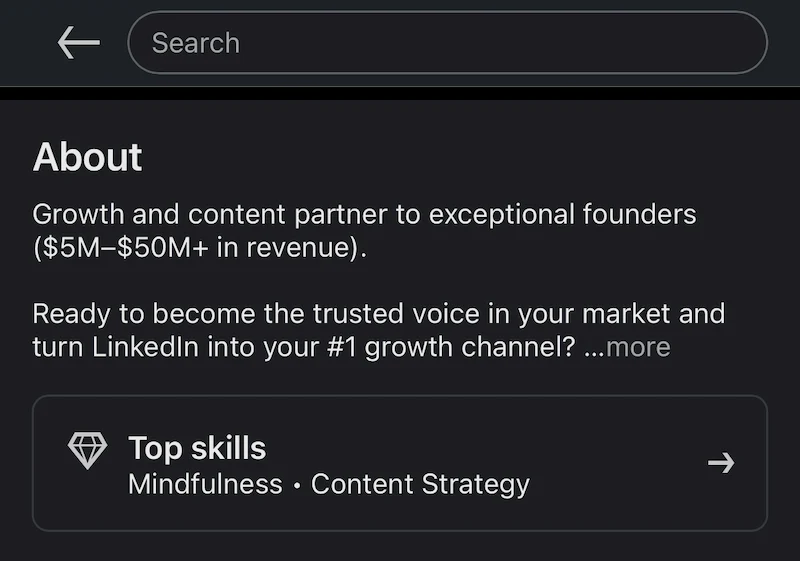
If I were rewriting a weak About section, the first thing I would check is whether a stranger can understand three things in under five seconds:
- What do you do?
- Why should anyone trust you?
- Where should they go next?
If the answer is no, it does not matter that the rest of the section is thoughtful. It is already losing. This also affects connection acceptance rate more than people realize, because your headline, photo, and summary preview work together as a credibility check before someone accepts a request. I broke that down more in my guide to getting more LinkedIn connections without being spammy.
What Keywords to Include in Your LinkedIn Summary
LinkedIn's search algorithm scans your summary for keyword relevance when deciding who surfaces in results. The right keywords, placed early, can help you appear when recruiters, buyers, or collaborators search for the type of person you are.
Here is how I approach keyword selection for a LinkedIn summary:
Role keywords
Include the job title or function people actually search for. If you are a B2B content strategist, that phrase should appear in your summary; do not rely on your headline alone to carry it.
Niche or industry keywords
Be specific. "SaaS marketing" outperforms "digital marketing" for most people because specificity makes you findable to a smaller, more relevant audience. The narrower your niche, the more your summary stands out in search.
Problem and outcome keywords
Terms like "demand generation," "pipeline," "lead generation," or "brand building" help you surface for intent-based searches: people looking for someone who delivers a particular result, not just holds a particular title.
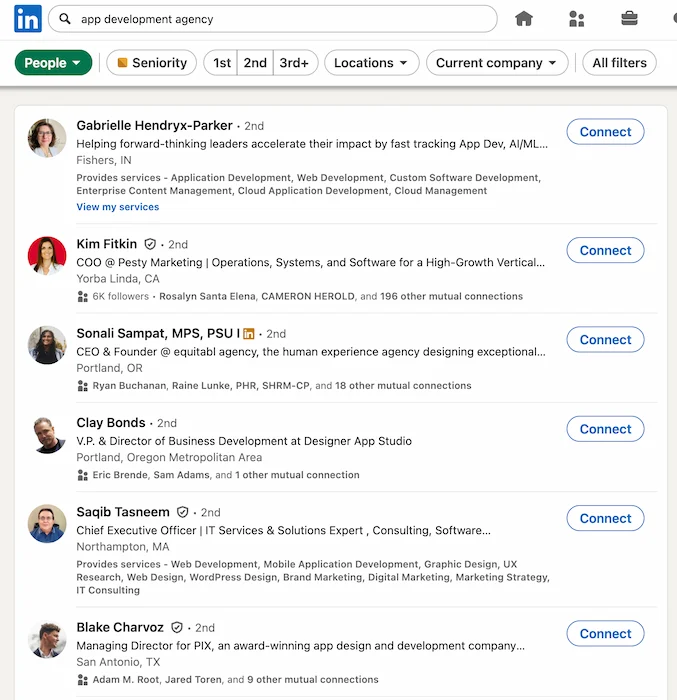
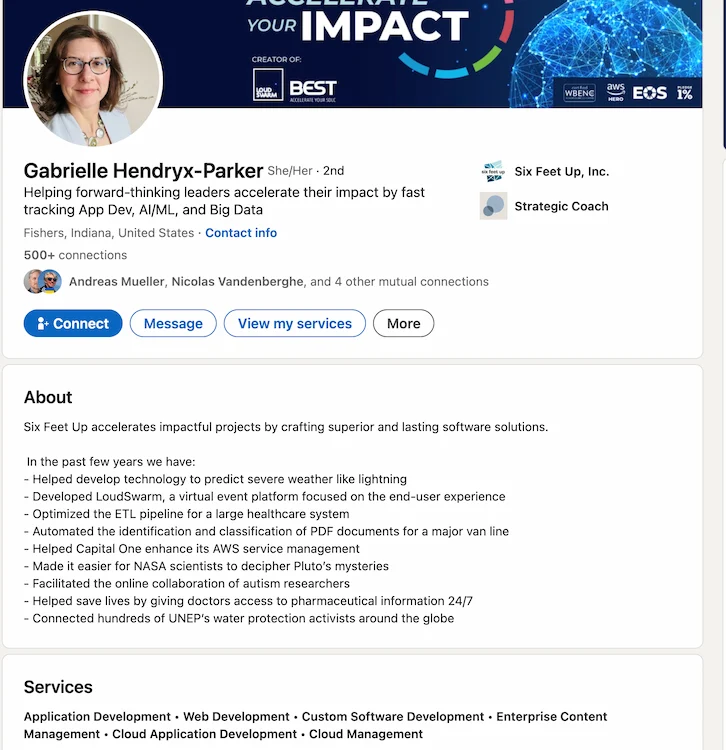
Gabrielle Hendryx-Parker's profile is a good example of this working in practice. Her headline contains "App Dev" explicitly, which is why she surfaces first for that search. Her summary does not keyword-dump: it leads with a company positioning line, then lists specific named client outcomes: NASA, Capital One, LoudSwarm, UNEP. Those specifics do two jobs at once: they contain the kind of language that surfaces in searches, and they prove the work is real.
Placement matters
LinkedIn's search appears to weight the early part of the summary more heavily. Try to work natural keyword phrases into the first paragraph rather than burying them in paragraph four.
A useful test: read the first 150 characters of your summary aloud. If it sounds like a keyword dump, pull back. If it sounds like a sentence a sharp operator would say, you are in good shape.
The 4-Part LinkedIn Summary Framework I Actually Use
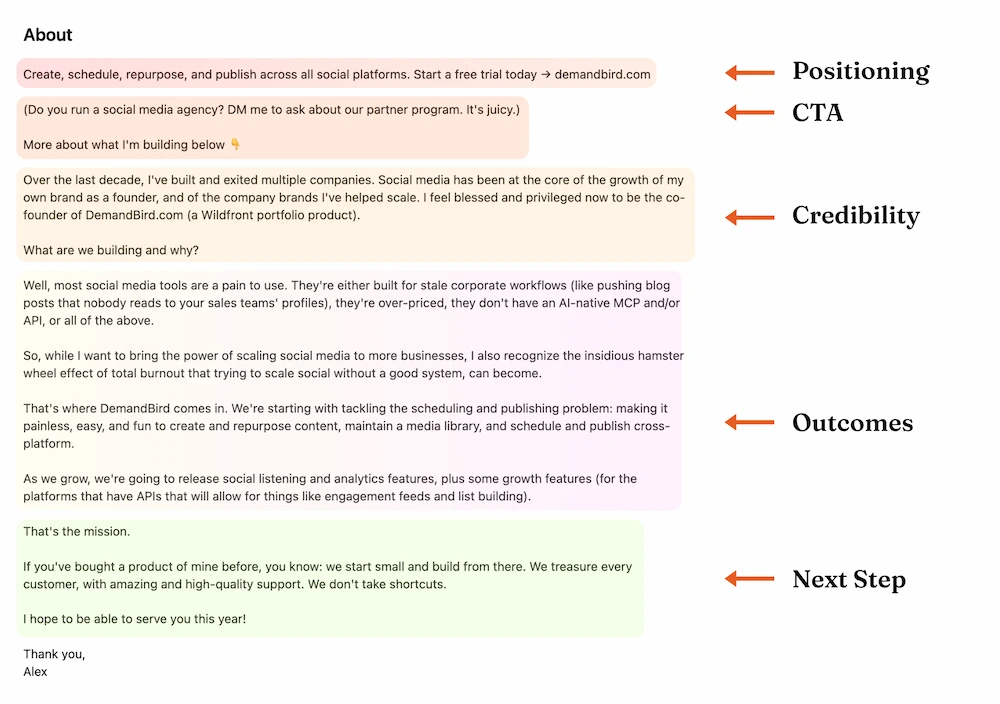
For most founders, consultants, and social media operators, I would structure a LinkedIn summary like this:
1. Open with positioning
Start with a short value statement, not your life story. Say who you help and the result you help create. I also put an early CTA here (a link or direct ask) for readers who already know enough and are ready to act. They should not have to scroll to the bottom to find out where to go. Get that in front of them before they ever click more.
2. Add immediate credibility
Give the reader proof that you are not guessing. This might be audience size, years doing the work, companies served, products built, or a sharp niche.
But the deeper test is this: can you talk about specific customer results and outcomes using the terms and jargon that your prospects use amongst themselves? If you can, that is what proves you have actually done the work. If you cannot, the summary will read like someone who plugged a prompt into ChatGPT and got back nice-sounding fluff with no bearing in reality.
That skepticism is real and it is growing. Buyers and hiring managers are increasingly good at spotting AI-generated professional copy that sounds competent but says nothing. The antidote is specificity that only comes from lived experience: a customer segment you know by name, a problem you have solved enough times to describe precisely, a result that has a number attached to it.
3. Show customer or business results
This is where most people get weak. The instinct is to describe yourself with adjectives: "strategic," "results-driven," "passionate." None of that is evidence. Replace it with outcomes.
Think of accomplishments here not as self-promotion but as evidence of your ability to deliver. A stranger reading your profile has no reason to trust you yet. Your results are what give them one. The types that work well:
- Metrics: audience growth, revenue impact, pipeline generated, retention rates, cost reductions. Even a rough range ("helped grow a podcast from 0 to 40k monthly downloads") beats a vague claim.
- Projects: a notable launch, a turnaround, something you built from scratch that did not exist before.
- Social proof: a short client result or a single strong quote kept to one or two lines. A wall of testimonials belongs in Featured, not here.
- Recognition: awards, rankings, or media mentions if genuinely relevant and recent.
The bar is not perfection. "Helped founders turn LinkedIn into a pipeline source" beats "strategic communicator." Numbers are better still, but an honest specific always beats a polished vague.
4. End with a next step
This is different from the early CTA in step one. By the time someone has read to the bottom of your summary, they have already decided they are interested. The closing section does not need to be a hard sell, it can be warmer, more human, more "here is what I believe and why I am building this." Done well, it leaves the reader feeling inspired enough that they scroll back up to the top and click the link they noticed on the way down.
What I want in the text
- Short paragraphs
- Easy scanning
- Specific commercial language
- Credibility before personality flourishes
What I avoid
- Generic founder bios
- Long services lists
- Dense walls of text
- Buried links and hidden CTAs
A Good Real Example
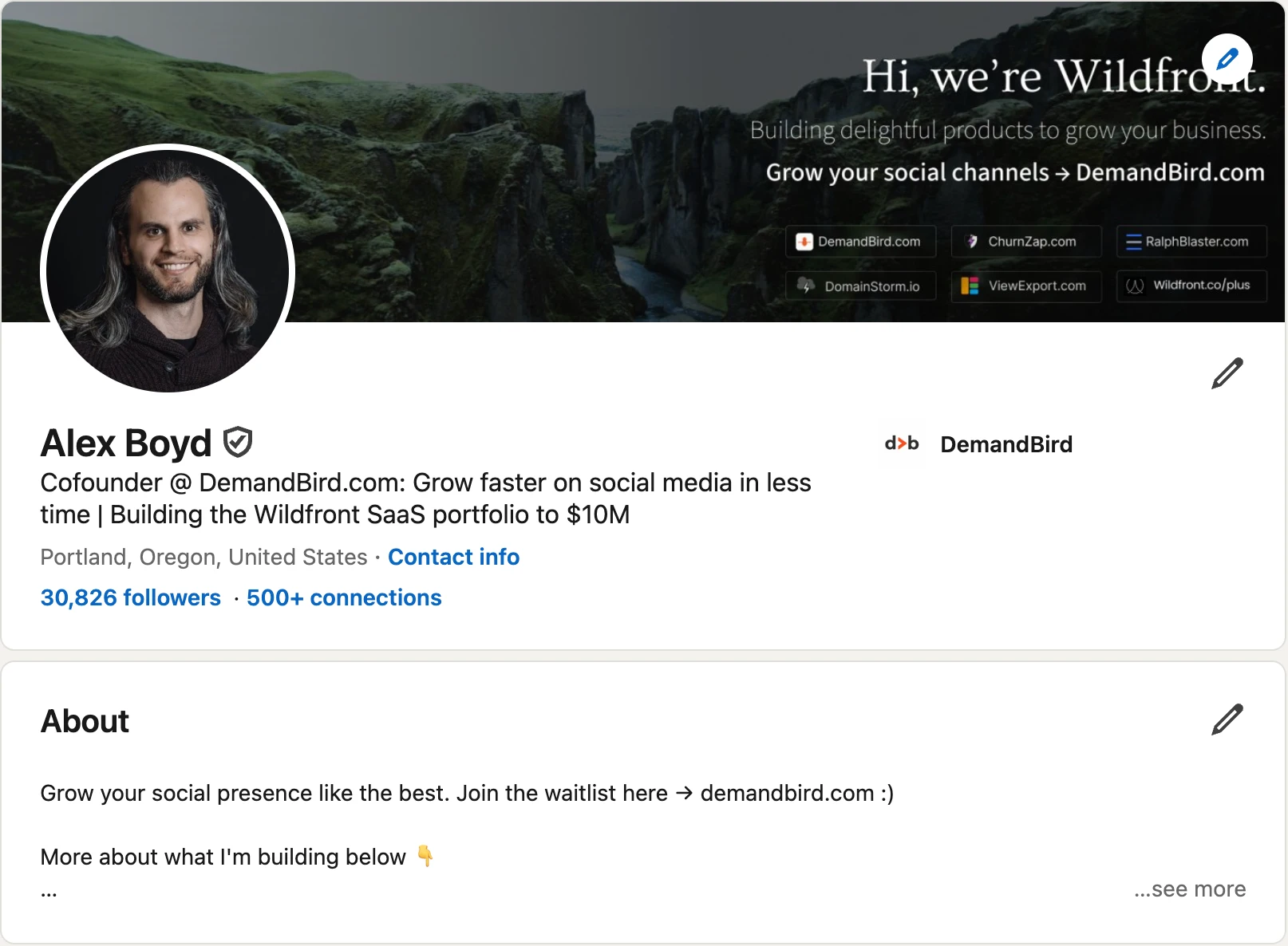
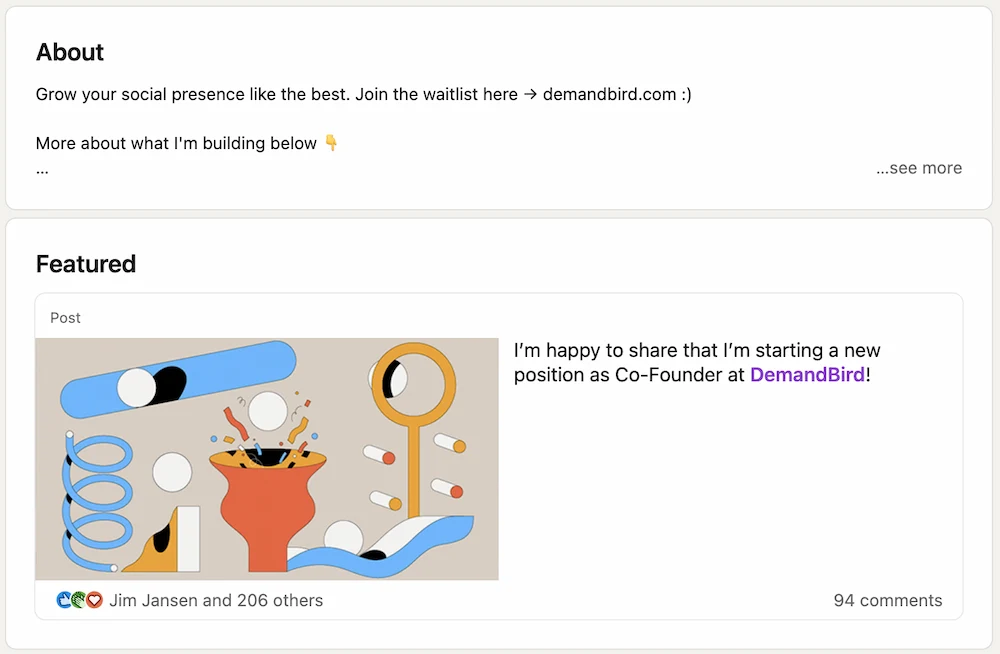
This is one of the reasons I like my own profile as a teaching example. It is not trying to be elegant. It is trying to be clear.
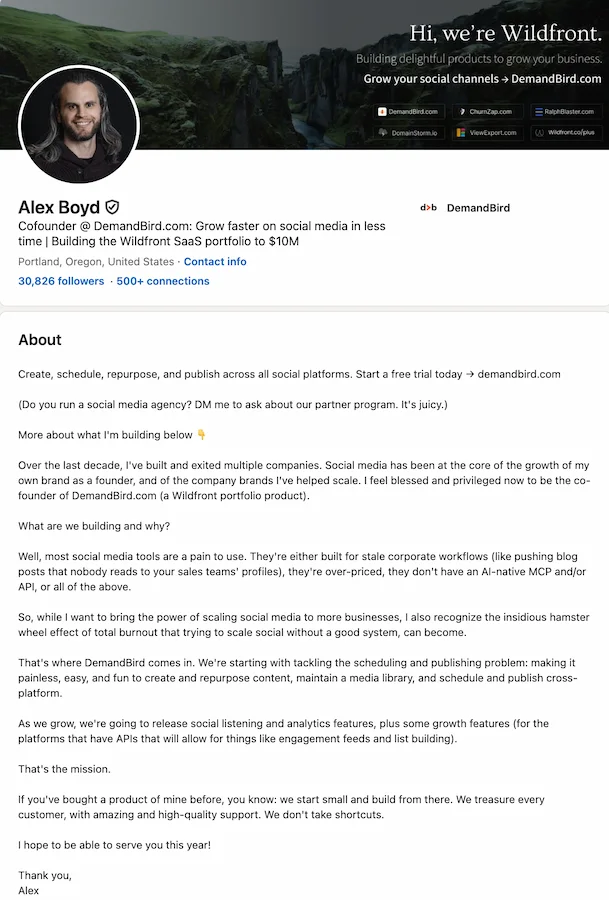
What works here:
- The website and desired destination appear immediately.
- The positioning is easy to understand.
- The copy is broken into short chunks instead of one giant paragraph.
- The text quickly shifts from biography into what is being built and why it matters.
The main reason I wrote the About section this way is it has two paths: one, if you're just here to try the product, you don't have to hunt for it; or, two, you want to know more about this person (me!) and are interested to keep on reading, so you can do so.
A Weak Real Example
This is the kind of About section I see all the time, especially on agency-adjacent or technical service profiles.
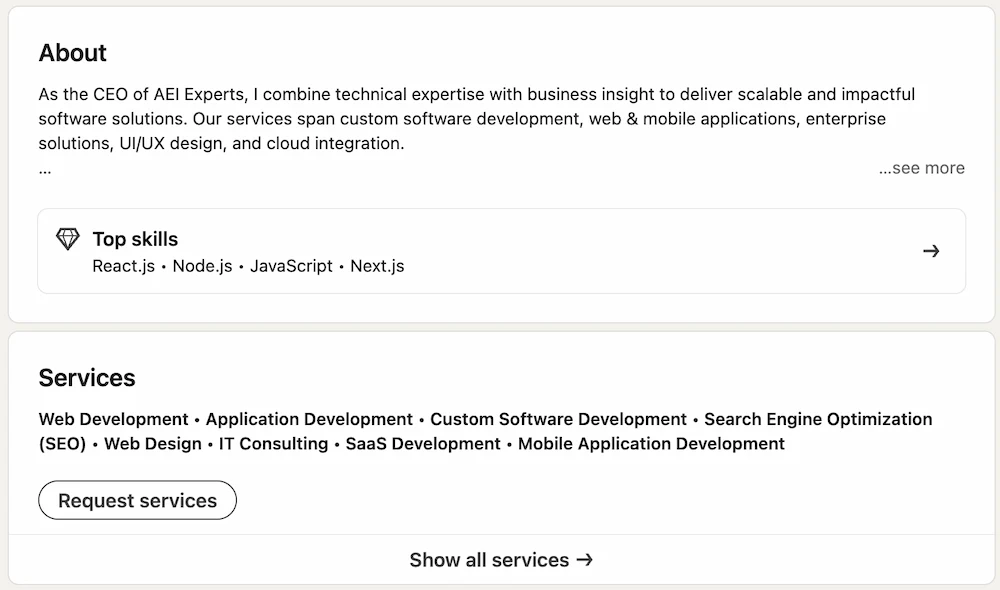
Where it could be improved:
- The company name here does not carry enough brand weight to be meaningful on its own; consider putting the title and brand combo lower, after you have established why anyone should care.
- It is hard to know, as a prospect, how you might benefit from "technical expertise and business insight"; that is something almost anyone can say.
- The services section is no longer necessary, and is actually a little distracting.
The whole thing reads like a list of technical capabilities, much of which can be done in Claude Code now anyhow, and so does not leave you as a reader feeling compelled to contact this person to hire them.
Your About Section And Featured Section Should Work Together
I do not think proof assets belong inside the summary itself.
Use About for
- Positioning
- Credibility
- Results summary
- CTA and website
Use Featured for
- Proof assets
- High-performing posts
- Offers and lead magnets
- Case studies and launches
If someone lands on your profile from a comment or a post, the best flow is usually: read the headline, skim the About preview, then click something in Featured.
If you have not already, also look at your top-of-profile website link. It is one of the cleanest ways to support the conversion path without forcing the About section to do everything by itself. We covered that more directly in our guide to adding a website link to your LinkedIn profile.
LinkedIn Summary Templates By Audience
These are not meant to be pasted word-for-word. They are the skeletons I would use.
Clear operator positioning
I help [type of company] turn social media into [result]. Over the last [timeframe], I've worked on [channel / capability / proof]. If you want [specific outcome], start here: [website or CTA].
Authority + commercial direction
I build [company / category] for [audience]. We help them [result]. I've learned this by [credibility point], and I share what is working in public. If you want to see what we are building, go to [site].
Proof-first service positioning
I help [audience] solve [painful problem] without [common bad alternative]. Recent wins include [result 1] and [result 2]. If you want to talk about your situation, message me or visit [site].
Niche + outcomes + next step
We help [niche] get [business result] from [channel / service]. Our work usually focuses on [2-3 capabilities], but the reason clients stay is [edge]. See examples or book a conversation here: [site].
Across all of these, I would still keep the same priorities: make it readable, demonstrate credibility, highlight results, and create an obvious path off LinkedIn.
If you want more profile examples beyond just the summary, read the full breakdown in these LinkedIn profile examples. If your headline is weak, fix that next with our guide to LinkedIn headline examples.
Why I Would Not Use LinkedIn's "Write With AI" for Your Summary
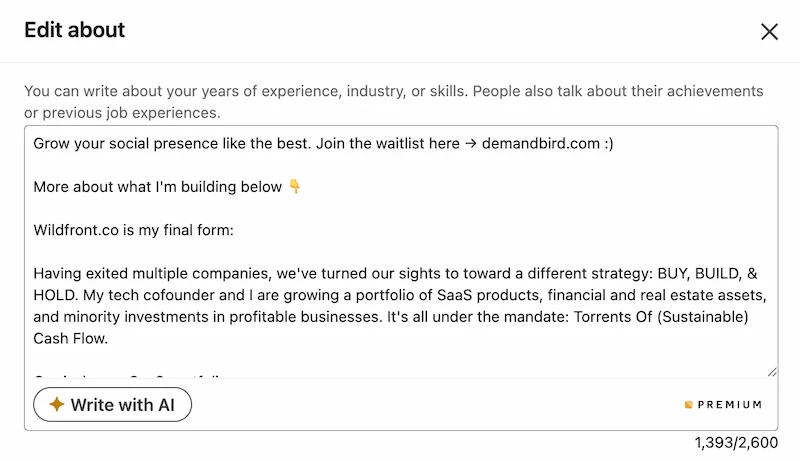
I would not touch it for this section. Your LinkedIn summary is some of the most important profile real estate you have, and it is not worth handing that over to LinkedIn's bad built-in AI.
When your summary matters commercially, I think you should write it yourself. The built-in AI tends to do three things badly:
- It makes everyone sound the same.
- It swaps sharp proof for vague professional language.
- It weakens commercial intent by removing direct calls to action.
My advice is simple: do not use it here at all. Write your LinkedIn summary yourself, because this is exactly the place where your real voice, real proof, and real commercial intent matter most.
Why Profile Clarity Compounds With Content
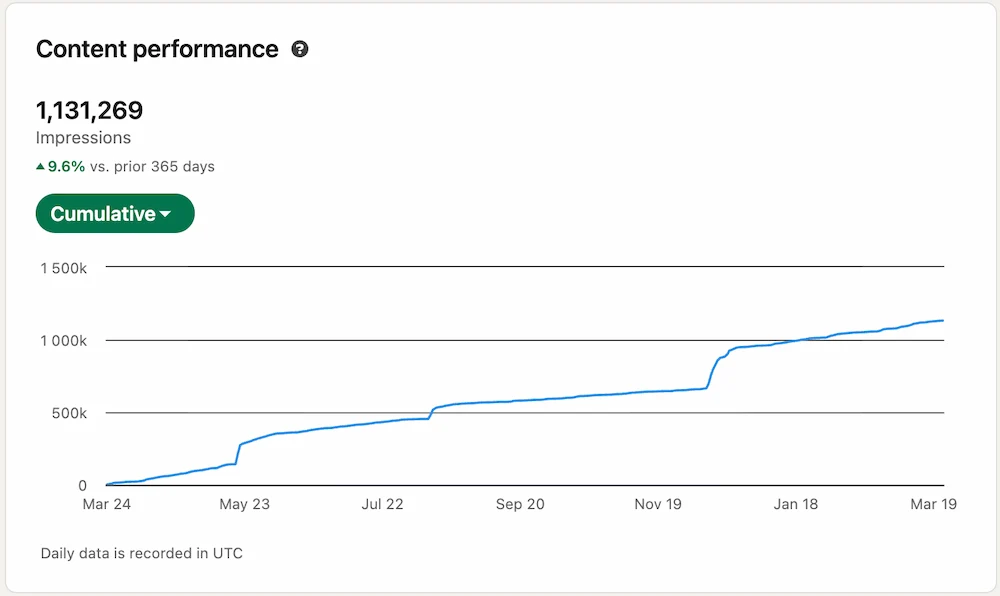
I would not claim that an About section alone creates this kind of reach. That would be lazy. Content, consistency, timing, audience fit, and distribution all matter.
But once your content does create attention, your profile becomes the conversion page behind it. People click through. They look at the headline. They glance at your summary. They check Featured. That is why profile clarity compounds with content performance instead of sitting in a separate bucket.
A strong LinkedIn summary does not create demand by itself. It stops you from leaking demand once people arrive.
If you want the broader profile system, not just the summary, pair this with our guide to LinkedIn profile optimization.
Frequently Asked Questions
What is the LinkedIn summary, and does it still exist?
LinkedIn renamed this field from "Summary" to "About" in the profile editor a few years ago. It is the same section in the same position on your profile. Everything about writing a good LinkedIn summary applies directly to what LinkedIn now calls the About section.
What keywords should I put in my LinkedIn summary?
Focus on three types: role keywords (your job title or function), niche keywords (industry or audience you serve), and outcome keywords (the problems you solve or results you create). Put them in the first paragraph: that is where LinkedIn's search algorithm gives them the most weight. Weave them into readable sentences instead of listing them as a keyword block.
What should you put in the first lines of your LinkedIn summary?
Lead with clarity, not autobiography. The first lines should tell a profile visitor who you help, what result you create, and where to go next. On strong commercial profiles, that often means a short positioning line plus a website, offer, or invitation to talk.
Should you put your website in your LinkedIn summary?
If your goal is off-LinkedIn conversations or conversions, yes. I prefer putting the website or call to action very high in the summary so it is visible in the preview instead of hidden at the bottom where most visitors will never see it.
How long should a LinkedIn summary be?
LinkedIn currently gives you up to 2,600 characters in the About editor, but the useful part is much smaller because most visitors only see the preview first. I would optimize the first two short paragraphs before worrying about filling the entire field.
Should your LinkedIn summary be in first person or third person?
Usually first person. It reads more naturally, feels more human, and sounds like a real operator instead of a brochure.
Is LinkedIn's Write with AI good enough for your summary?
No. I would not use it at all for your summary. This is some of the most important real estate on your profile, and LinkedIn's built-in AI usually makes it more generic, less credible, and less commercially sharp.
Turn a strong profile into a stronger content engine
DemandBird helps founders, consultants, and agencies write better content, repurpose it faster, and turn more profile views into actual pipeline.
Start Free Trial