
Most LinkedIn About sections are too vague, too corporate, and too buried under generic service language to turn profile views into actual conversations.
If you run social for a founder, sell consulting, or operate an agency, that is a problem. Your About section is not there to sound impressive. It is there to make the right person trust you fast enough to click, reply, or reach out.
This is the framework I would use for social media marketers, founders, consultants, and agencies that want a profile to support real business outcomes rather than just look polished.
- The first lines of your About section matter more than the last 80% because LinkedIn truncates aggressively on mobile and in collapsed desktop view.
- I prefer putting the website or next step very high in the About section if off-LinkedIn conversions matter.
- A strong About section should show four things fast: positioning, credibility, results, and a next action.
- Featured is where proof assets belong; About is where clarity belongs.
- AI can help generate a draft, but it usually weakens differentiation unless you edit hard.
What Your LinkedIn About Section Is Actually Supposed To Do
I think most people start from the wrong question. They ask, "How do I make my About section sound professional?" The better question is, "What does this section need to accomplish?"
For commercially-minded profiles, your About section should do four jobs:
- Establish relevance: tell people who you help and what you help them achieve.
- Demonstrate credibility: show that you have actually done the thing, not just talked about it.
- Highlight results: give visitors a concrete reason to believe you can create value.
- Create a next step: invite someone off LinkedIn into a website visit, call, inbox conversation, or trial.
That is also why I do not think of the About section as a resume paragraph. It is closer to a profile conversion layer. Someone discovers you through content, comments, a search result, or a connection request, then lands on your profile and asks one question: is this person worth talking to?
Why The First Lines Matter So Much
LinkedIn gives you a decent amount of space overall, but the preview is tiny. In the editor screenshot below, LinkedIn currently shows a 2,600-character limit. In reality, most people will judge the section based on the first lines they can see before tapping more.
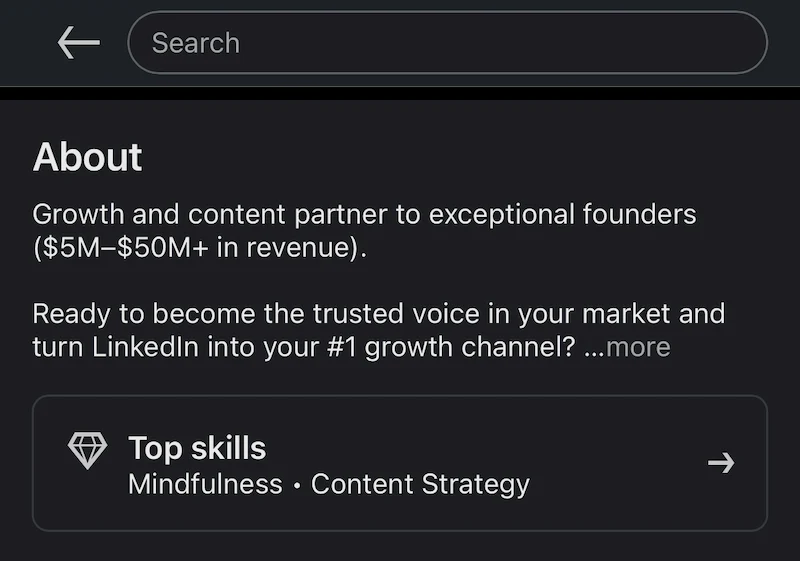
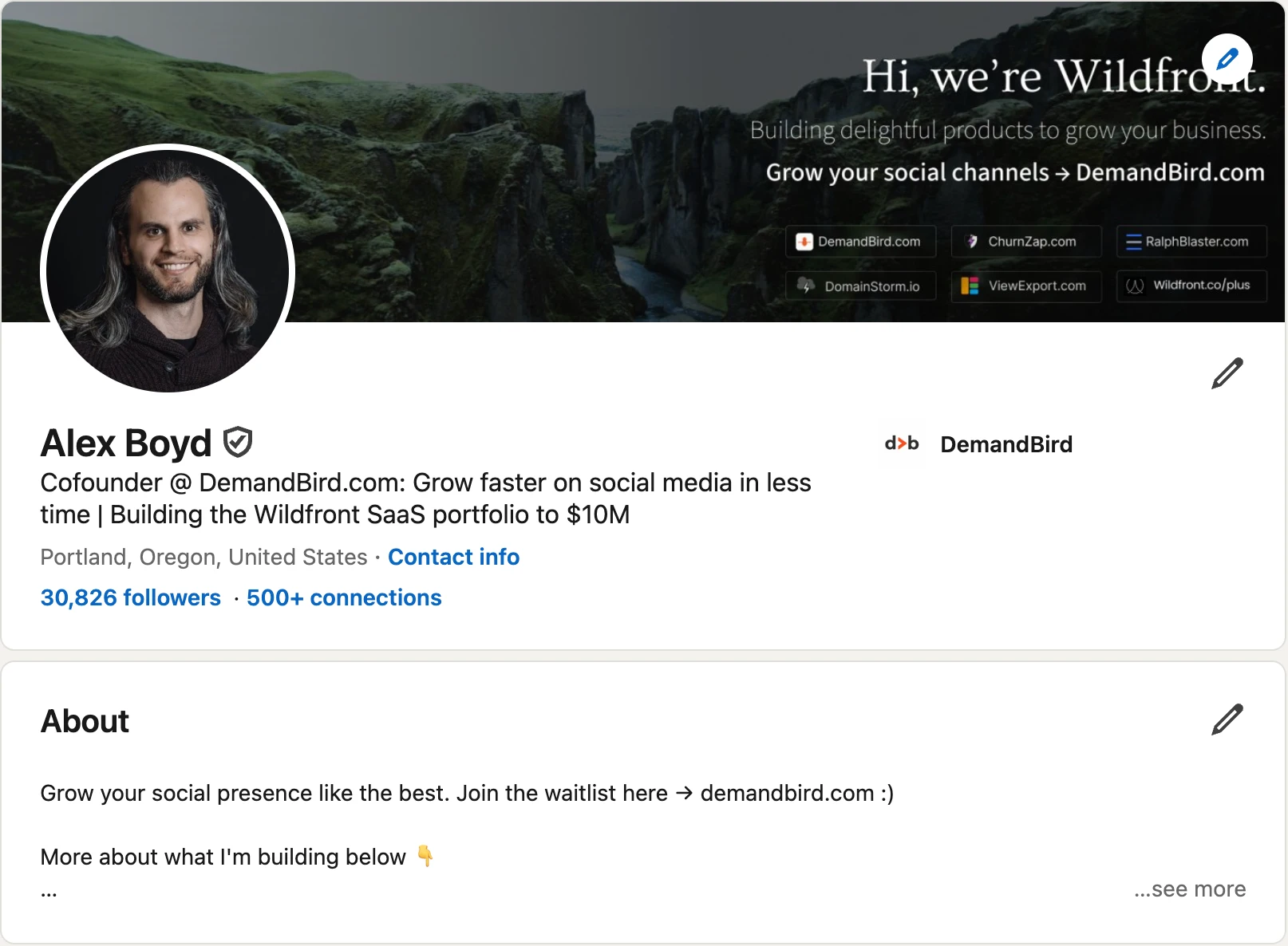
If I were rewriting a weak About section, the first thing I would check is whether a stranger can understand three things in under five seconds:
- What do you do?
- Why should anyone trust you?
- Where should they go next?
If the answer is no, it does not matter that the rest of the section is thoughtful. It is already losing. This also affects connection acceptance rate more than people realize, because your headline, photo, and About preview work together as a credibility check before someone accepts a request. I broke that down more in my guide to getting more LinkedIn connections without being spammy.
The 4-Part LinkedIn About Section Framework I Actually Use
For most founders, consultants, and social media operators, I would structure the section like this:
1. Open with positioning
Start with a short value statement, not your life story. Say who you help and the result you help create. If you want off-LinkedIn conversions, I also recommend putting your website in these first few lines so the next step is visible before someone ever clicks more.
2. Add immediate credibility
Give the reader proof that you are not guessing. This might be audience size, years doing the work, companies served, products built, or a sharp niche.
3. Show customer or business results
This is where most people get weak. Replace adjectives with outcomes. "Strategic" is weak. "Helped founders turn LinkedIn into a pipeline source" is better. Numbers are better still.
4. End with a next step
Tell the visitor what to do next. Visit the site. Book a call. Reply to a message. Check the Featured section. Join the waitlist. Whatever the action is, make it obvious.
What I want in the text
- Short paragraphs
- Easy scanning
- Specific commercial language
- Credibility before personality flourishes
What I avoid
- Generic founder bios
- Long services lists
- Dense walls of text
- Buried links and hidden CTAs
A Good Real Example
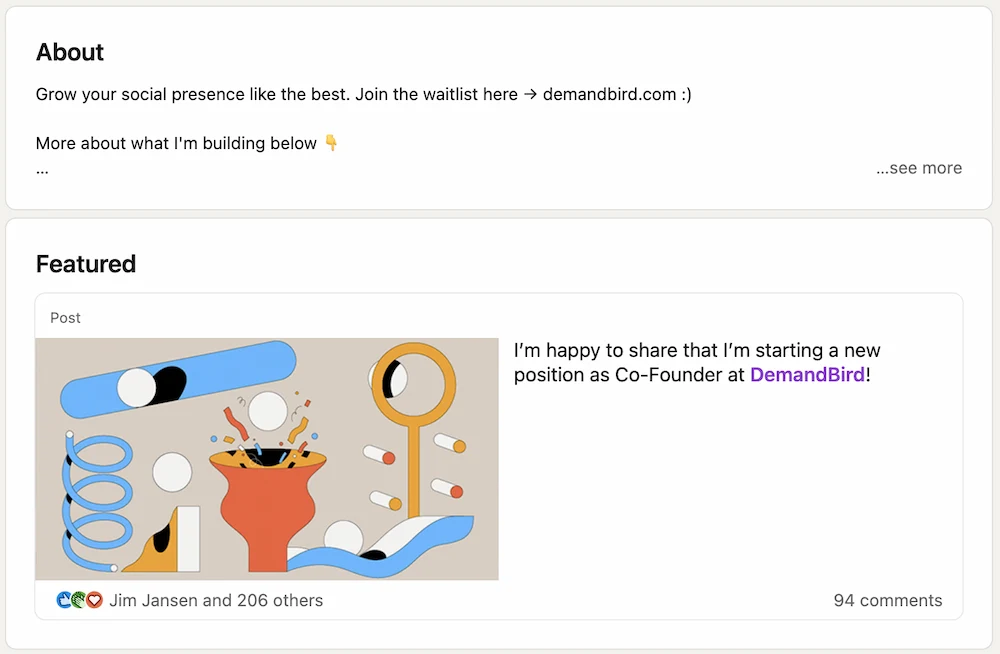
This is one of the reasons I like my own profile as a teaching example. It is not trying to be elegant. It is trying to be clear.
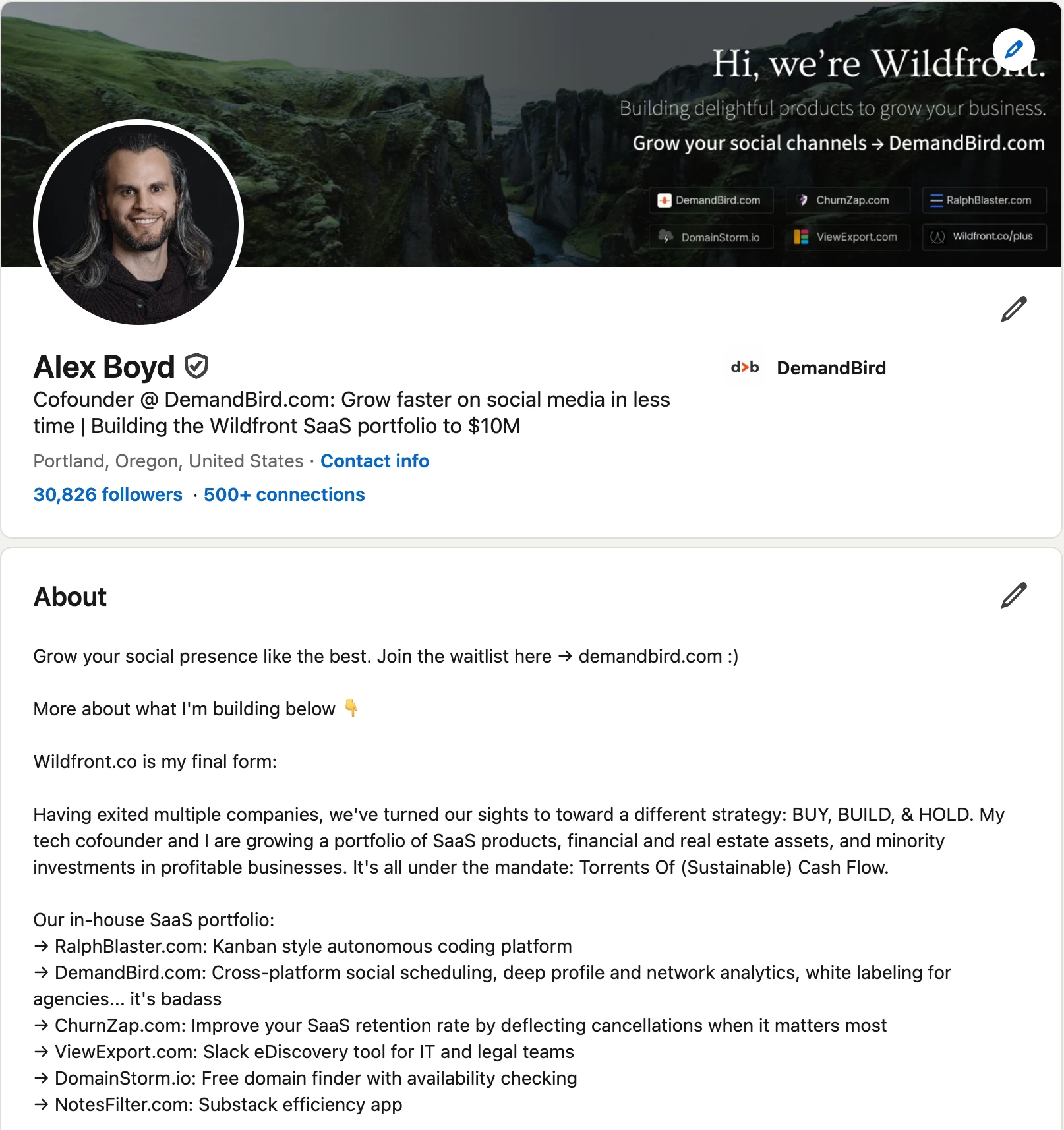
What works here:
- The website and desired destination appear immediately.
- The positioning is easy to understand.
- The copy is broken into short chunks instead of one giant paragraph.
- The text quickly shifts from biography into what is being built and why it matters.
I also like that the About section does not try to hold every proof asset itself. It points the visitor toward the rest of the profile experience.
A Weak Real Example
This is the kind of About section I see all the time, especially on agency-adjacent or technical service profiles.
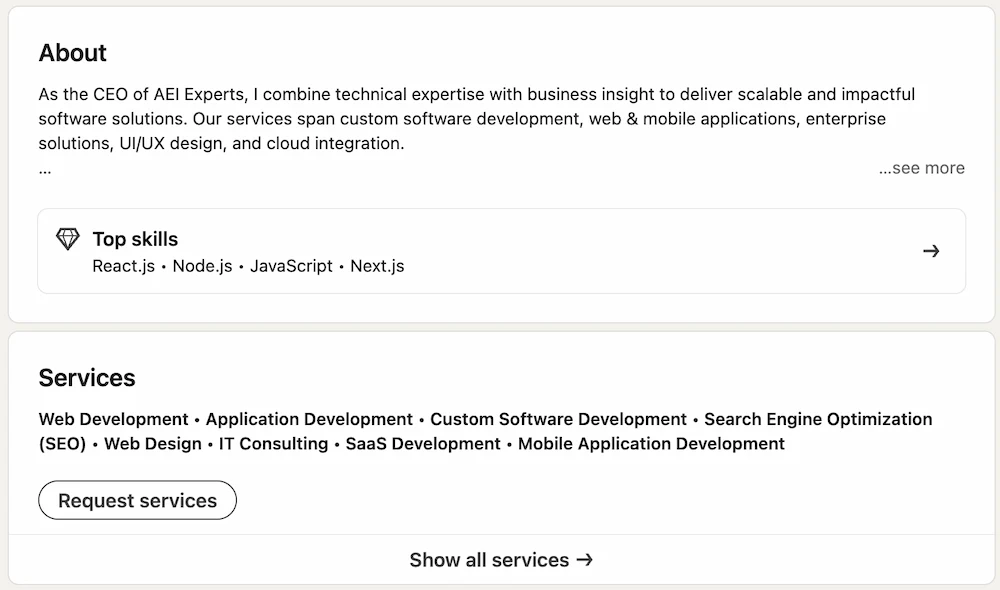
What is weak about it:
- It starts with a generic title-led introduction.
- It lists broad capabilities instead of proving a point of view.
- The services list below it makes the profile feel commoditized.
- There is no strong reason to continue reading or leave LinkedIn.
That is the trap. A section can be technically fine and still commercially weak. It can sound professional and still fail to make someone care.
Your About Section And Featured Section Should Work Together
The archived article this piece came from treated proof assets almost like they belonged inside the About section itself. I do not think that is the right framing anymore.
Use About for
- Positioning
- Credibility
- Results summary
- CTA and website
Use Featured for
- Proof assets
- High-performing posts
- Offers and lead magnets
- Case studies and launches
If someone lands on your profile from a comment or a post, the best flow is usually: read the headline, skim the About preview, then click something in Featured.
If you have not already, also look at your top-of-profile website link. It is one of the cleanest ways to support the conversion path without forcing the About section to do everything by itself. We covered that more directly in our guide to adding a website link to your LinkedIn profile.
LinkedIn About Section Templates By Audience
These are not meant to be pasted word-for-word. They are the skeletons I would use.
Clear operator positioning
I help [type of company] turn social media into [result]. Over the last [timeframe], I've worked on [channel / capability / proof]. If you want [specific outcome], start here: [website or CTA].
Authority + commercial direction
I build [company / category] for [audience]. We help them [result]. I've learned this by [credibility point], and I share what is working in public. If you want to see what we are building, go to [site].
Proof-first service positioning
I help [audience] solve [painful problem] without [common bad alternative]. Recent wins include [result 1] and [result 2]. If you want to talk about your situation, message me or visit [site].
Niche + outcomes + next step
We help [niche] get [business result] from [channel / service]. Our work usually focuses on [2-3 capabilities], but the reason clients stay is [edge]. See examples or book a conversation here: [site].
Across all of these, I would still keep the same priorities: make it readable, demonstrate credibility, highlight results, and create an obvious path off LinkedIn.
If you want more profile examples beyond just the About section, read the full breakdown in these LinkedIn profile examples. If your headline is weak, fix that next with our guide to LinkedIn headline examples.
Why I Would Not Blindly Use LinkedIn's Write With AI
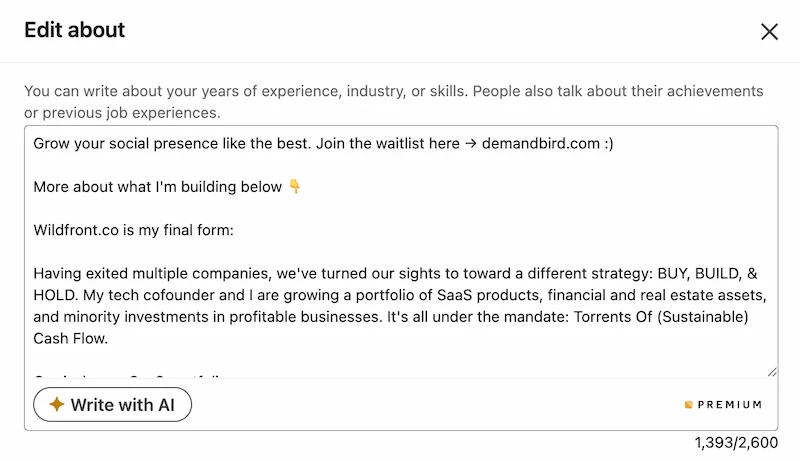
I would not touch it for this section. Your LinkedIn About is some of the most important profile real estate you have, and it is not worth handing that over to LinkedIn's bad built-in AI.
When the About section matters commercially, I think you should write it yourself. The built-in AI tends to do three things badly:
- It makes everyone sound the same.
- It swaps sharp proof for vague professional language.
- It weakens commercial intent by removing direct calls to action.
My advice is simple: do not use it here at all. Write the About section yourself, because this is exactly the place where your real voice, real proof, and real commercial intent matter most.
Why Profile Clarity Compounds With Content
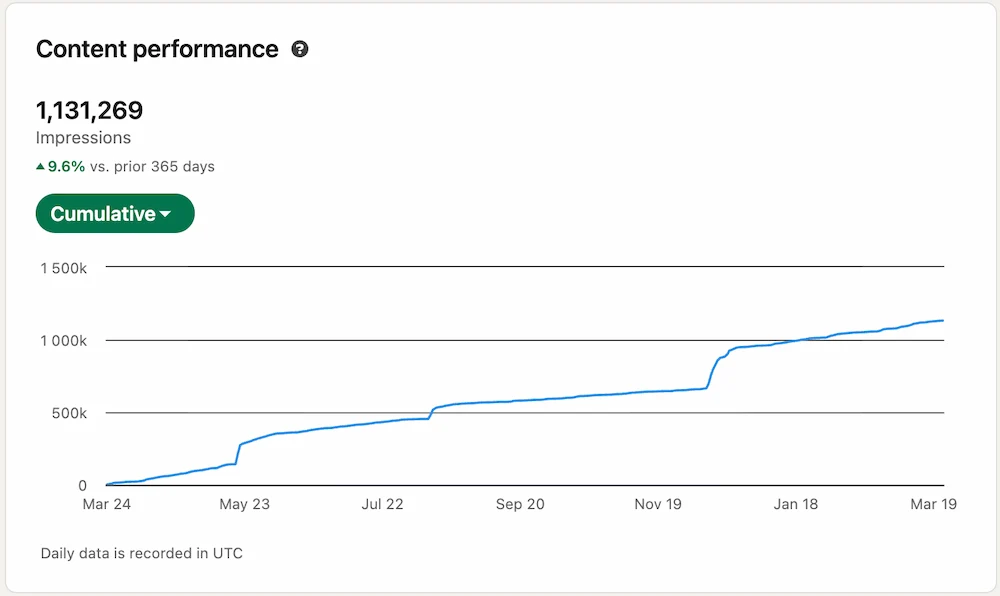
I would not claim that an About section alone creates this kind of reach. That would be lazy. Content, consistency, timing, audience fit, and distribution all matter.
But once your content does create attention, your profile becomes the conversion page behind it. People click through. They look at the headline. They glance at the About section. They check Featured. That is why profile clarity compounds with content performance instead of sitting in a separate bucket.
A strong About section does not create demand by itself. It stops you from leaking demand once people arrive.
If you want the broader profile system, not just the About section, pair this with our guide to LinkedIn profile optimization.
Frequently Asked Questions
What should you put in the first lines of your LinkedIn About section?
Lead with clarity, not autobiography. The first lines should tell a profile visitor who you help, what result you create, and where to go next. On strong commercial profiles, that often means a short positioning line plus a website, offer, or invitation to talk.
Should you put your website in your LinkedIn About section?
If your goal is off-LinkedIn conversations or conversions, yes. I prefer putting the website or call to action very high in the About section so it is visible in the preview instead of hidden at the bottom where most visitors will never see it.
How long should a LinkedIn About section be?
LinkedIn currently gives you up to 2,600 characters in the About editor, but the useful part is much smaller because most visitors only see the preview first. I would optimize the first two short paragraphs before worrying about filling the entire field.
Should your LinkedIn About section be in first person or third person?
Usually first person. It reads more naturally, feels more human, and sounds like a real operator instead of a brochure.
Is LinkedIn's Write with AI good enough?
No. I would not use it at all for your About section. This is some of the most important real estate on your profile, and LinkedIn's built-in AI usually makes it more generic, less credible, and less commercially sharp.
Turn a strong profile into a stronger content engine
DemandBird helps founders, consultants, and agencies write better content, repurpose it faster, and turn more profile views into actual pipeline.
Start Free Trial