
LinkedIn messages are private between you and the recipient. Your connections, followers, and employer cannot see your conversations. That said, there are real limits to that privacy worth understanding, especially around read receipts, message deletion, and what LinkedIn itself can access.
Are LinkedIn Messages Private?
Yes, with two important caveats.
Private from other users: No one other than you and the recipient can see a LinkedIn message thread. Your connections, mutual contacts, and followers have no access to your inbox.
Private from employers: Your employer cannot see messages sent from your personal LinkedIn account. GDPR and the Electronic Communications Privacy Act (ECPA) protect private communications from employer access. The exception is if you are messaging from a company-controlled LinkedIn account, or from a work device your employer actively monitors — in those situations, the protections are weaker and you should treat messages accordingly.
Not private from LinkedIn: LinkedIn messages are not end-to-end encrypted. LinkedIn, as the platform operator, retains access to messages at the infrastructure level and can review them when investigating Terms of Service violations or responding to valid legal requests. In practice this is rare, but it means LinkedIn DMs are not the right channel for anything you would treat as legally sensitive.
One other limit worth naming: if the recipient takes a screenshot or forwards your message, you have no control over where it goes. Privacy protections apply to the platform, not to the person you're talking to.
How to Know If Someone Read Your Message
LinkedIn has read receipts built into its messaging system. When your message has been delivered but not yet read, a small grey checkmark appears below it. When the recipient reads it, that checkmark is replaced by a small circular version of their profile photo.
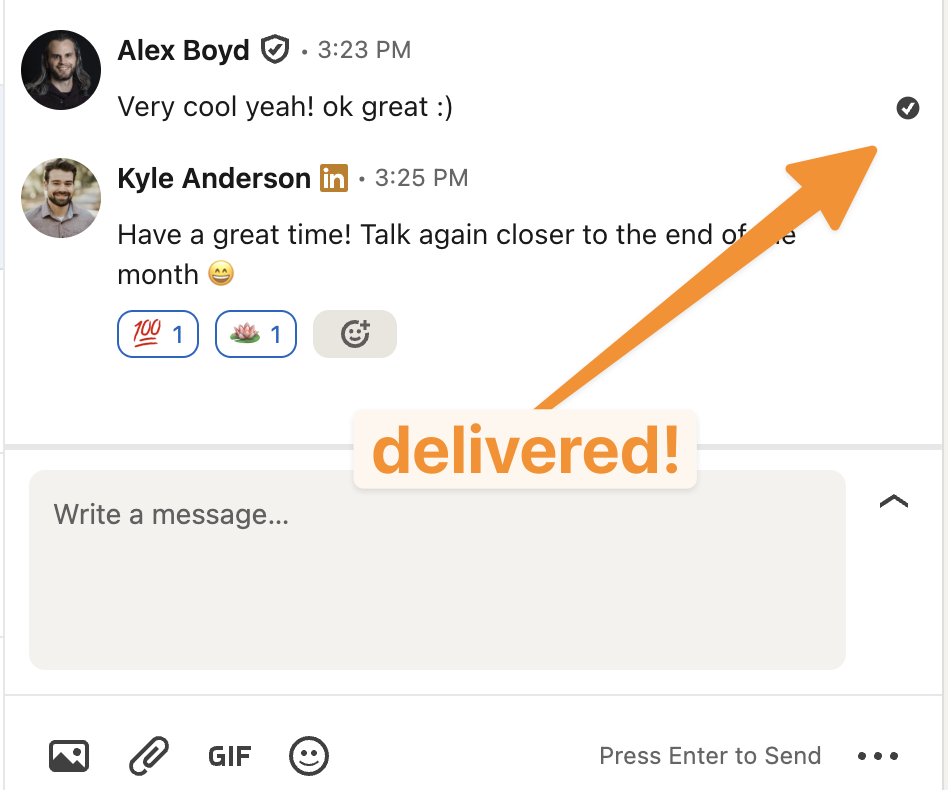
There is one important condition: read receipts only work if both parties have them enabled. If the recipient has turned off read receipts in their settings, their profile photo will not appear, and you will have no way to know whether they read the message.
To check or change your own read receipt setting:
- Go to Settings & Privacy → Data Privacy
- Select Delivery and typing indicators
- Toggle the setting on or off
You can also go directly to linkedin.com/mypreferences/d/settings/read-receipts.
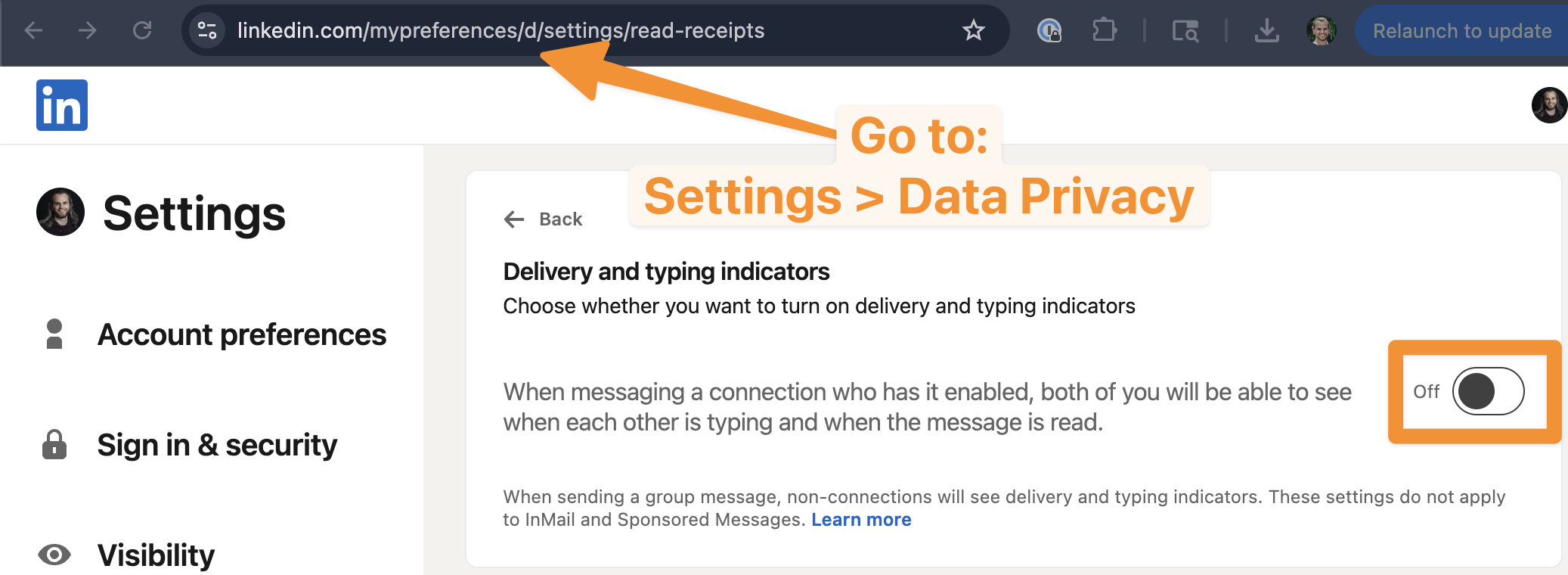
Note that disabling read receipts is mutual: if you turn them off, you also stop seeing read receipts from others.
Deleting LinkedIn Messages
LinkedIn gives you two deletion options, with very different outcomes:
Deleting a single message (60-minute window)
You can delete an individual message within 60 minutes of sending it. To do this, hover over the message, click the three-dot menu (•••), and select Delete. When you do, both you and the recipient see a placeholder: "This message has been deleted." The message is gone from both sides, but the recipient can see that something was deleted.
After 60 minutes, single-message deletion is no longer available. There is no unsend option once that window closes.
Deleting an entire conversation
You can remove a full conversation from your inbox at any time. Hover over the conversation in your message list, click •••, and select Delete conversation. This removes it from your inbox only. The other person still has the full thread in their inbox — deleting a conversation does not delete it for both parties. If you want a copy of your conversations before cleaning up your inbox, you can export your LinkedIn messages and contacts first.
InMail vs Regular LinkedIn Messages
LinkedIn has two distinct messaging systems with different rules:
| Feature | Regular message | InMail |
|---|---|---|
| Who you can message | 1st-degree connections only | Anyone on LinkedIn |
| Requires Premium | No | Yes (uses credits) |
| Subject line | No | Yes |
| Read receipts | Yes (if both enabled) | No |
| Typing indicators | Yes | No |
| Recipient can decline | No | Yes |
Regular messages also reach members of shared LinkedIn Groups and anyone who has set their profile to "Open" for messages, even without a connection. InMail is the tool for cold outreach to people outside your network, but response rates tend to be lower than warm connection-based messages — recipients know an InMail is unsolicited by design.
Want to grow the network that makes cold outreach unnecessary?
DemandBird helps you build a LinkedIn presence that brings inbound conversations to you.
Build a LinkedIn presence worth messaging you about
DemandBird helps B2B teams grow their reach and generate inbound conversations — without cold outreach.
Frequently Asked Questions
Are LinkedIn messages private?
LinkedIn messages are private between you and the recipient. Other users, connections, and employers cannot see your conversations. LinkedIn itself can access messages in limited circumstances — investigating Terms of Service violations or responding to legal requests. Messages are not end-to-end encrypted, so LinkedIn retains access at the infrastructure level.
Can your employer see your LinkedIn messages?
No, not from a personal account. Your employer cannot access messages sent from your personal LinkedIn profile. The exception is a company-owned LinkedIn account or a work device your employer monitors — in those cases, treat messages as potentially visible.
How do you know if someone read your LinkedIn message?
When someone reads your message, their profile photo appears below it in the thread, replacing the grey delivery checkmark. This only works if both you and the recipient have read receipts enabled. If they have turned read receipts off, you will not see the profile photo icon regardless of whether they read it.
How do you delete a LinkedIn message?
To delete a single message, hover over it, click the three-dot menu, and select Delete — but only within 60 minutes of sending. After deletion, both parties see "This message has been deleted." To remove a full conversation, hover over it in your inbox, click •••, and select Delete conversation. This removes it from your inbox only; the other person still has the thread.
What is the difference between InMail and a regular LinkedIn message?
Regular messages go to 1st-degree connections only. InMail lets you message anyone on LinkedIn without a connection, but requires Premium credits. InMail includes a subject line; regular messages do not. Read receipts and typing indicators are available on regular messages but not on InMail.