Posts that sound like you, from your AI chat

Ask Claude or ChatGPT in plain words. DemandBird writes in your own voice with your brand on top, fills your queue, and shows you what worked, right in the chat.

Works withClaudeChatGPTClaude CodeCodex
Claude

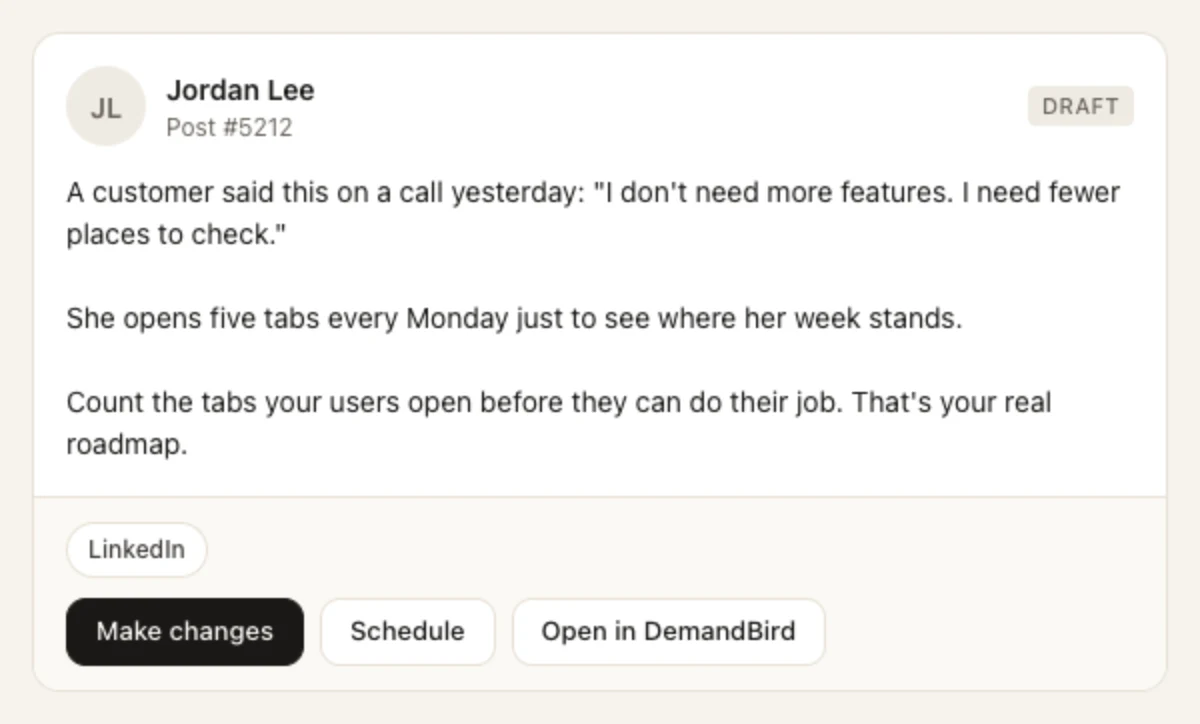
Write a LinkedIn post from this call transcript.

DemandBird draft preview card showing a LinkedIn draft by Jordan Lee about a customer who wants fewer places to check, with Make changes, Schedule and Open in DemandBird buttons
Draft preview card

Six things to ask today

Copy a prompt, paste it into your AI app, and you get the answer shown next to it. In Claude and ChatGPT on the web and desktop, DemandBird answers with cards you can act on, not just text.

See what worked, and why

β€œShow my top posts this quarter and tell me why they worked.”

DemandBird ranks your published posts by impressions across every channel you post to. The AI reads the winners side by side and tells you what they have in common.

Tools it uses: list_top_posts

ChatGPT

Show my top posts this quarter and tell me why they worked.
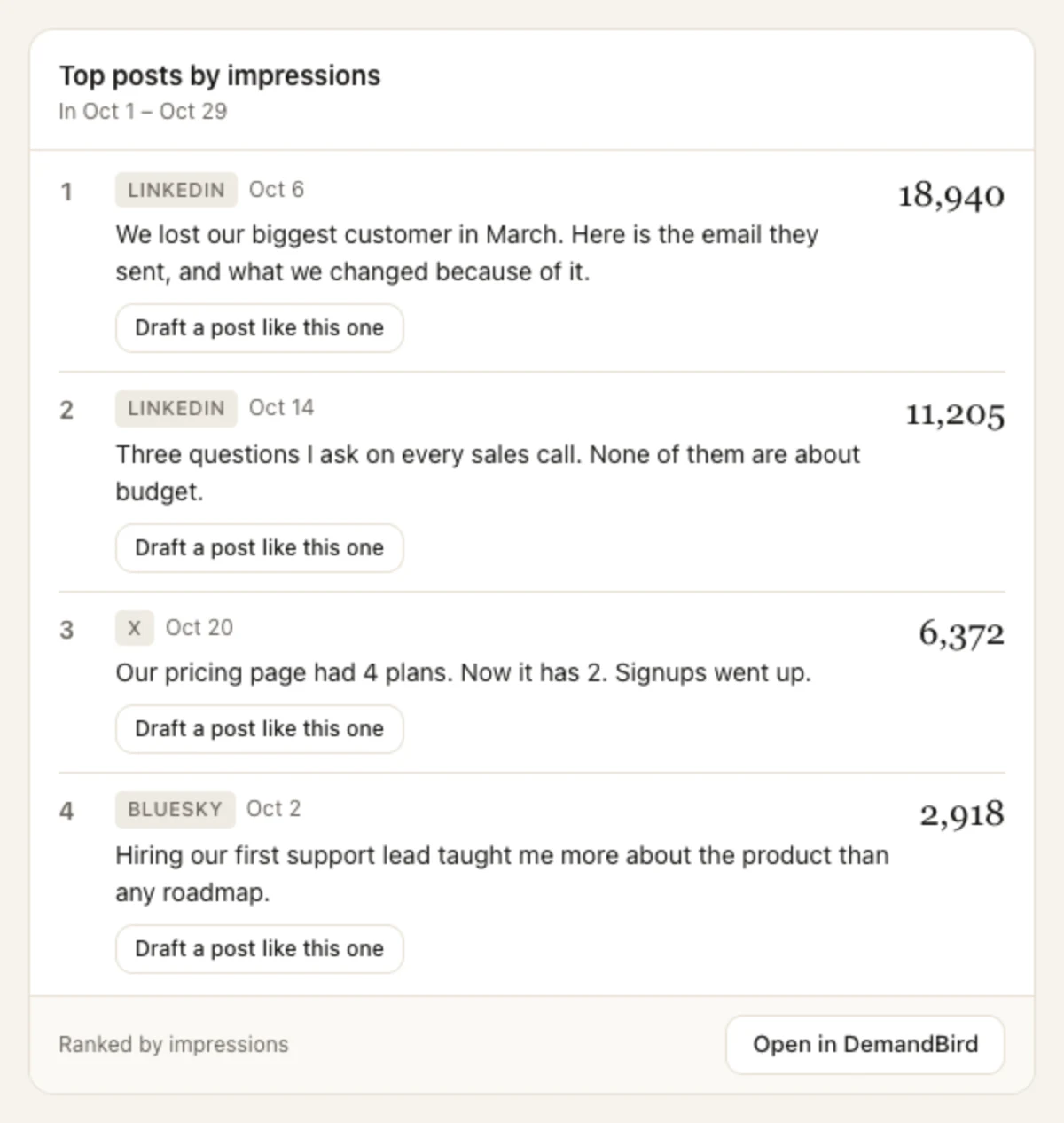
DemandBird top posts card listing four posts from this quarter, ranked by impressions, with a LinkedIn post about losing a big customer at the top
Top posts card

Turn a call into a post that sounds like you

β€œWrite a LinkedIn post from this call transcript.”

Paste or attach the transcript under the prompt.

The draft is written in the voice DemandBird learned from your own posts, with your workspace brand on top. The transcript is saved with the post as source material, so you and your reviewers can check it. It never ends up in the post.

Tools it uses: draft_post, attach_reference

Claude

Write a LinkedIn post from this call transcript.

DemandBird draft preview card showing a LinkedIn draft by Jordan Lee about a customer who wants fewer places to check, with Make changes, Schedule and Open in DemandBird buttons
Draft preview card

Same chat as β€œTurn a call into a post that sounds like you”

Edit it by saying what you want

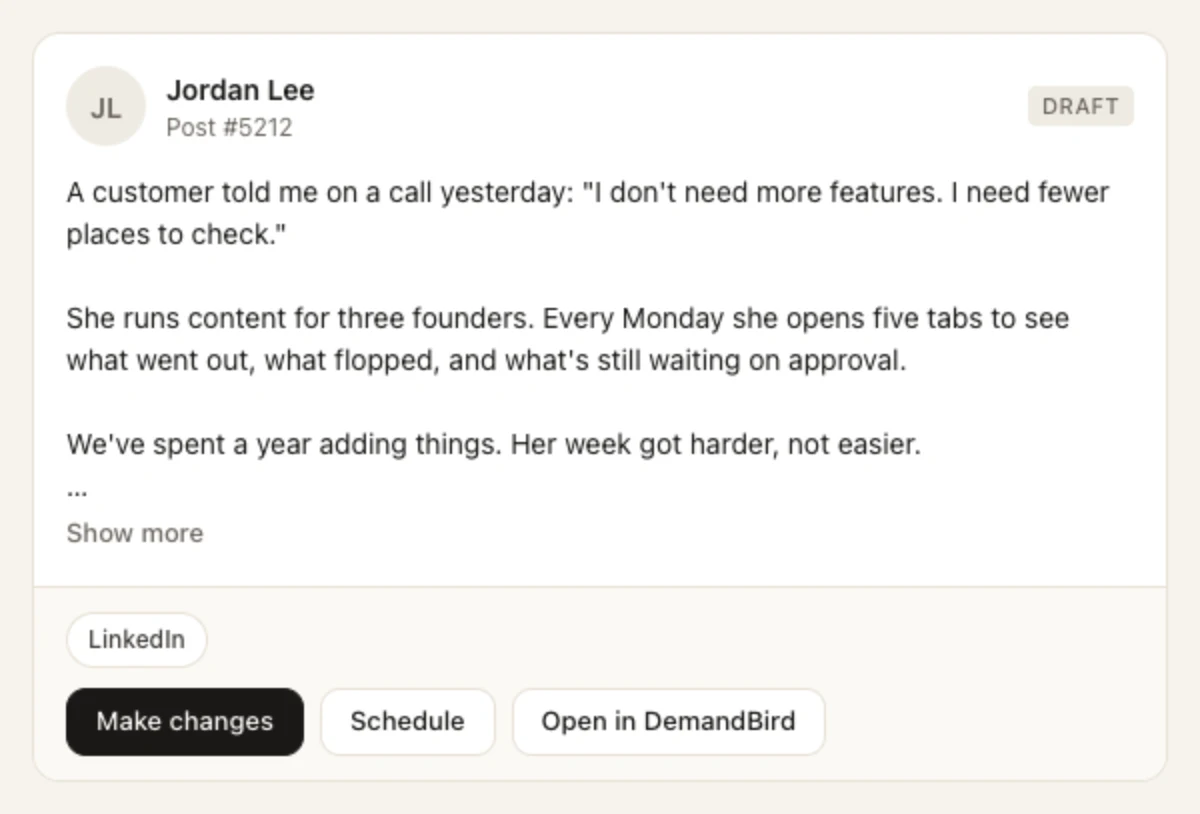
β€œMake it shorter and less salesy.”

The same draft is rewritten in place, so you keep one post, not a pile of versions. Any images on it stay put.

Tools it uses: revise_draft

Claude

Make it shorter and less salesy.

The same DemandBird draft preview card, now three short paragraphs long
Draft preview card

Fill next week from your idea list

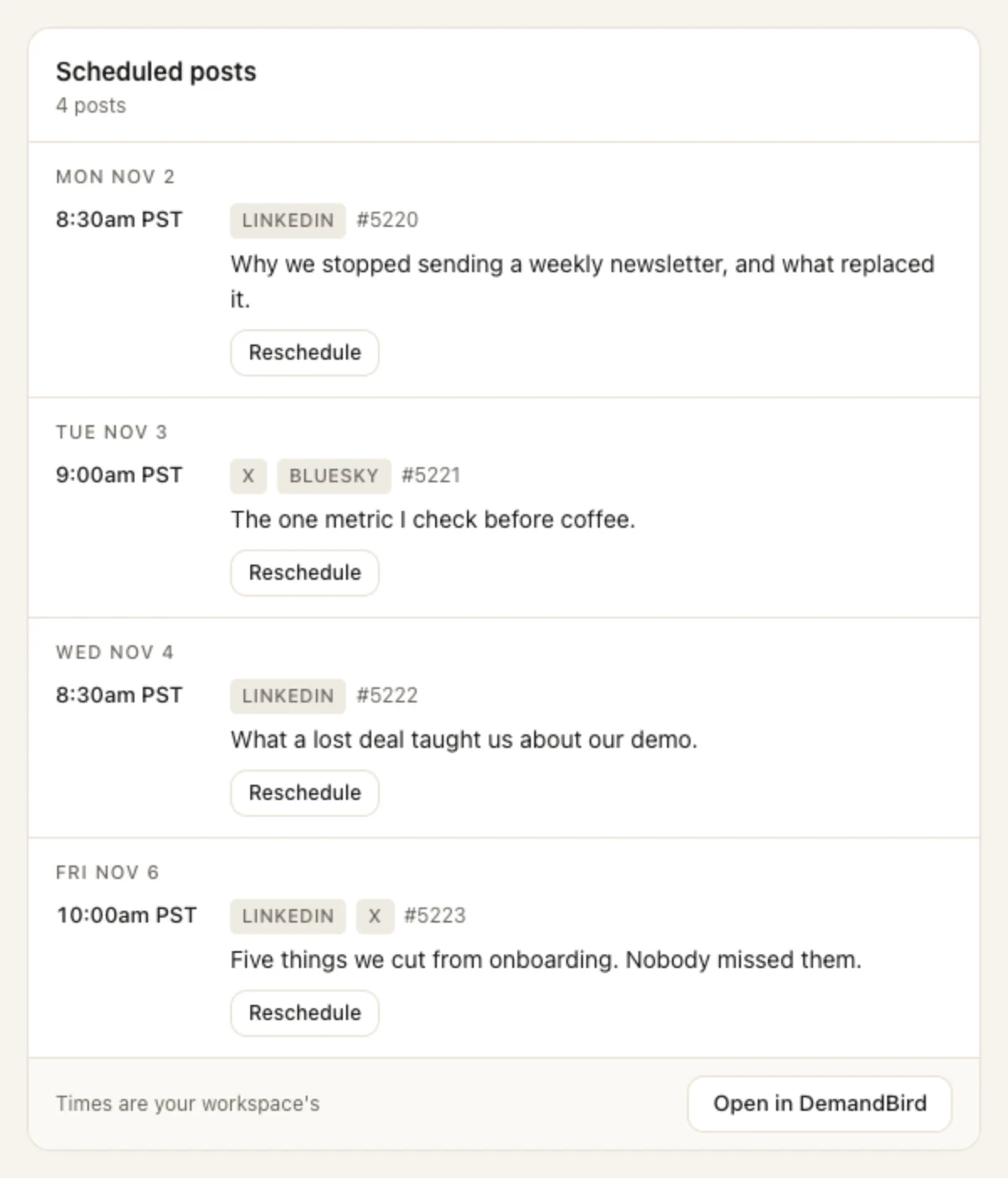
β€œFill my queue for next week from my ideas.”

The AI picks ideas you saved in DemandBird, drafts each one in your voice, and drops them into your open queue times. Then it shows you the week.

Tools it uses: list_ideas, draft_post, queue_post, list_scheduled_posts

ChatGPT

Fill my queue for next week from my ideas.

DemandBird schedule card showing four posts queued across Monday to Friday on LinkedIn, X and Bluesky
Schedule card

For agencies

Spot the client who is slipping

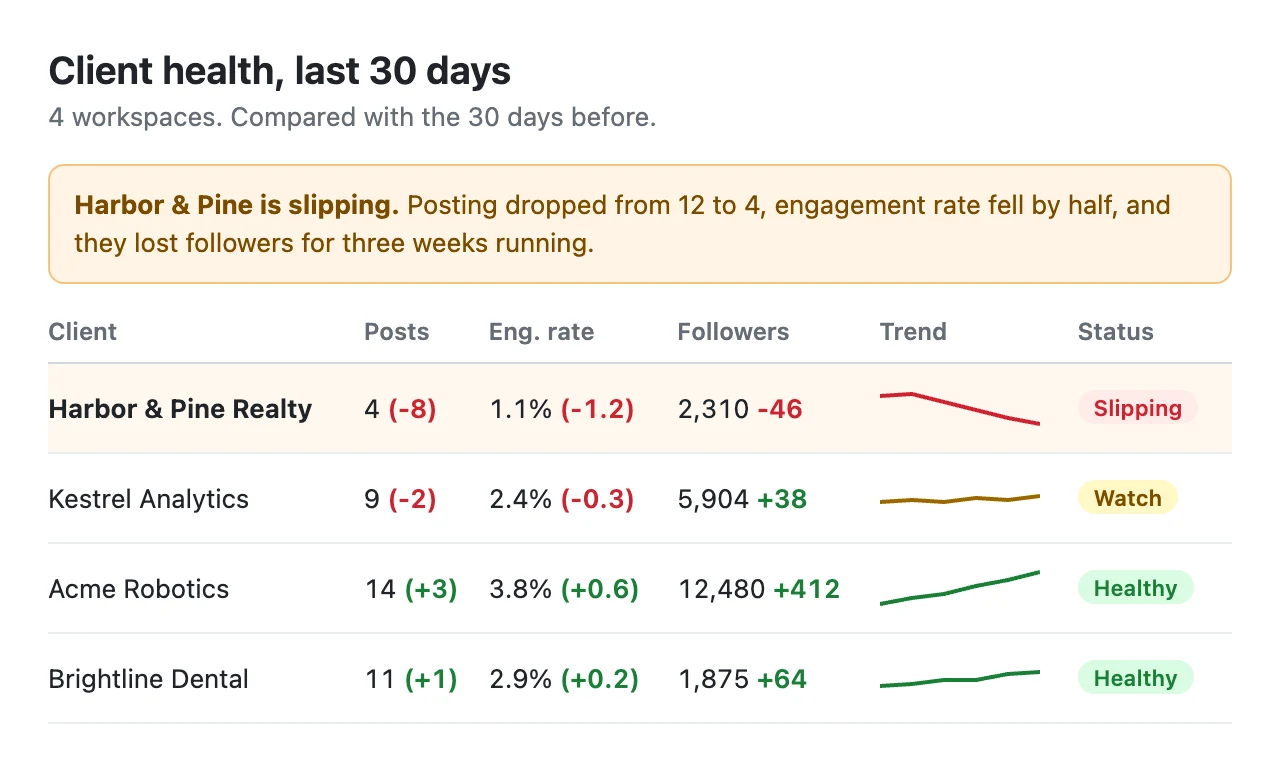
β€œWhich of my clients is slipping? Build me a dashboard.”

DemandBird hands over each client workspace's posts, results and follower history. Claude compares them and builds the dashboard as an artifact you can keep and share.

Tools it uses: list_workspaces, list_posts_with_metrics, get_follower_history

Claude

Which of my clients is slipping? Build me a dashboard.

A dashboard Claude built comparing four client workspaces over 30 days, flagging Harbor and Pine Realty as slipping
Drawn by Claude from DemandBird data

On Business and Agency plans

Send it to your client for review

β€œSend this to my client for review.”

The post goes to your client in DemandBird with your note. It can't publish until they approve it, and approving takes a click in DemandBird, not a word in a chat.

Tools it uses: request_review

Claude

Send this to my client for review.

Done. I sent post #5212 to Dana Ortiz at Harbor & Pine for review.

It won't publish until Dana approves it. She'll get an email with a link to the post in DemandBird.

Plain reply

Screenshots use a test account. The cards are DemandBird's real cards; Claude Code, Codex and the phone apps show the same answers as text.

Your AI can't post without you

It can draft, edit, schedule and ask for review. The steps that put something out under your name stay with you.

Publishing takes your click

When you ask your AI to publish a post or approve a client's post, DemandBird sends back a link instead of doing it. You open the link, check the post in DemandBird, and press the button yourself. The AI can show you the link; it can't click it.

You sign in, you don't paste a token

Connecting opens DemandBird's own sign-in page (OAuth). You log in there and click Allow, so your password and API keys never go into a chat. You can disconnect from your AI app's settings at any time.

Connect your app

There's nothing to install. Every app uses the same server URL, and you sign in to DemandBird once.

https://app.demandbird.com/mcp
ClaudeWeb, desktop and phone
  1. In Claude, open Settings, then Connectors, and click Add custom connector.
  2. Name it DemandBird and paste the server URL.
  3. Click Connect, sign in to DemandBird, and click Allow.
Full steps
ChatGPTPaid plans, on the web
  1. In Settings, then Apps, turn on Developer mode under Advanced settings.
  2. Click Create app, paste the server URL, and set Authentication to OAuth.
  3. Sign in to DemandBird and click Allow. In a chat, click + and pick DemandBird.
Full steps
Claude CodeTerminal, VS Code and JetBrains
  1. Run this command:
    claude mcp add --transport http demandbird https://app.demandbird.com/mcp
  2. Run /mcp, pick demandbird, and sign in when your browser opens.
Full steps
CodexOpenAI’s coding agent
  1. Run this command:
    codex mcp add demandbird --url https://app.demandbird.com/mcp
  2. Run codex mcp login demandbird and sign in when your browser opens.
Full steps

Using DemandBird in AI apps is on every paid plan: Pro, Business and Agency. Cursor, VS Code and other MCP apps work too: see the setup docs.

Try it on your own posts

7-day free trial. No contracts.