What is MCP?
The Model Context Protocol (MCP) lets Claude connect to external tools and services. With the DemandBird MCP server connected, Claude can read your drafts, generate AI-written posts in your voice, schedule content, and manage your queue — all through natural conversation.
Setup
- Get your API tokenIn DemandBird, go to Settings → API Tokens and create a token. Copy it — you'll need it in the next step.
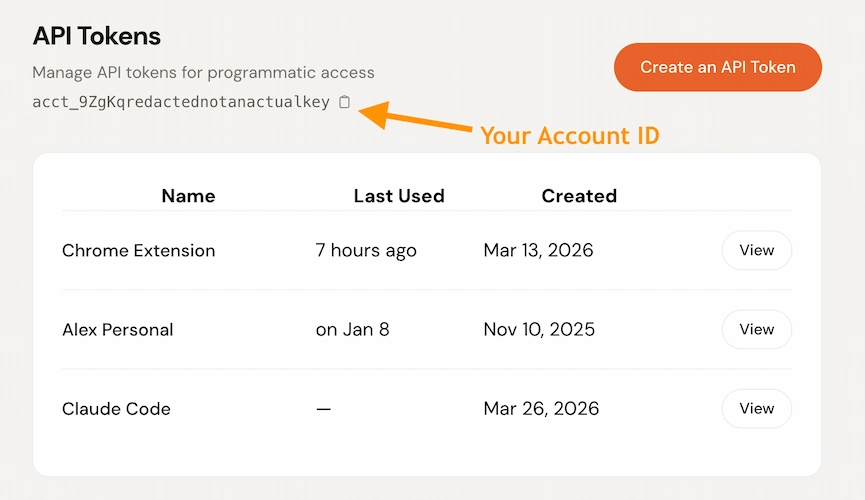
- Configure your Claude appFollow the Claude Desktop or Claude Code instructions below.
Claude Desktop
Open (or create) ~/Library/Application Support/Claude/claude_desktop_config.jsonand add the demandbird server under mcpServers:
{
  "mcpServers": {
    "demandbird": {
      "type": "http",
      "url": "https://app.demandbird.com/mcp",
      "headers": {
        "Authorization": "Bearer your-token-here"
      }
    }
  }
}X-Account-Id header with your account ID to set a default account. You can find your account ID on the Settings page. If omitted, Claude will ask which account to use."headers": {
"Authorization": "Bearer your-token-here",
"X-Account-Id": "acct_your-account-id"
}%APPDATA%\Claude\claude_desktop_config.json.Claude Code
This works for Claude Code in the terminal, VS Code, JetBrains, and the desktop app.
Run this command in your terminal:
claude mcp add --transport http demandbird https://app.demandbird.com/mcp \
  --header "Authorization: Bearer your-token-here"
Or add it manually to ~/.claude.json:
{
  "mcpServers": {
    "demandbird": {
      "type": "http",
      "url": "https://app.demandbird.com/mcp",
      "headers": {
        "Authorization": "Bearer your-token-here"
      }
    }
  }
}--header "X-Account-Id: acct_your-account-id" to set a default. If omitted, Claude will ask which account to use.Example prompts
Once connected, you can talk to DemandBird in plain English:
Done! Draft saved (post #124). Here's what I wrote: “We just shipped something that's been...”
You have 3 drafts:
• Post #124: LinkedIn: “We just shipped something...”
• Post #121: Twitter, Threads: “The one thing I wish I knew...”
• Post #118: LinkedIn: “Hot take on AI in marketing...”
Post #124 scheduled for 2026-03-03T09:00:00Z on LinkedIn.
Post #121 queued on Twitter and Threads.
Scheduled times:
• twitter: 2026-03-03T08:00:00Z
• threads: 2026-03-03T10:00:00Z
Tool reference
list_accounts
No parameters required.
select_account
| Parameter | Type | Description |
|---|---|---|
| account_idrequired | string | Account prefix ID (e.g., acct_xxx) or numeric ID. Use list_accounts to find your IDs. |
draft_post
| Parameter | Type | Description |
|---|---|---|
| promptrequired | string | What to write about. E.g., “a post about launching my new SaaS product” |
| platformoptional | string | Target platform: linkedin, twitter, threads, bluesky, substack, youtube. Influences tone and length. |
| youtubeoptional | object | YouTube-specific options: { title?, privacy_status?, thumbnail_url? }. title max 100 chars (auto-derived from the first line if omitted); privacy_status is public, unlisted, or private (defaults to public). A video must be attached via images before the post can be scheduled or published. |
save_draft
| Parameter | Type | Description |
|---|---|---|
| contentrequired | string | The post text to save. |
| platformsoptional | array of strings | Target platforms. Same values as draft_post. |
| youtubeoptional | object | YouTube-specific options. Same shape as draft_post (title, privacy_status, thumbnail_url). |
update_draft
| Parameter | Type | Description |
|---|---|---|
| idrequired | number | Post ID to update. |
| contentoptional | string | New post content. Replaces the existing text. |
| platformsoptional | array of strings | Updated target platforms. Replaces the existing selection. |
| youtubeoptional | object | Replace the YouTube variant fields. Same shape as draft_post. Pass {} to clear them. |
list_drafts
| Parameter | Type | Description |
|---|---|---|
| statusoptional | string | One of: draft, scheduled, posted, failed. Defaults to draft. |
| limitoptional | number | Max posts to return (default 20, max 100). |
get_post
| Parameter | Type | Description |
|---|---|---|
| idrequired | number | Post ID. |
delete_post
| Parameter | Type | Description |
|---|---|---|
| idrequired | number | Post ID to delete. |
schedule_post
| Parameter | Type | Description |
|---|---|---|
| idrequired | number | Post ID to schedule. |
| scheduled_atrequired | string (ISO 8601) | When to publish. E.g., 2026-03-10T09:00:00Z. Must be in the future. |
| platformsoptional | array of strings | Platforms to schedule on. If omitted, uses platforms already set on the post. |
queue_post
| Parameter | Type | Description |
|---|---|---|
| idrequired | number | Post ID to queue. |
| platformsoptional | array of strings | Platforms to queue for. If omitted, uses platforms already set on the post. |
Returns the exact scheduled time for each platform based on your posting queue. Use get_queue_slots first if you want to see available times before queueing.
get_queue_slots
| Parameter | Type | Description |
|---|---|---|
| platformsrequired | array of strings | Platforms to check. E.g., ["linkedin", "twitter"]. |
list_connected_accounts
| Parameter | Type | Description |
|---|---|---|
| platformoptional | string | Filter to a single platform. Same values as draft_post. |
Use the returned ids with platform_account_ids on schedule_post or queue_post to post from a specific account.
request_review
| Parameter | Type | Description |
|---|---|---|
| post_idrequired | string | ID of the draft to send for review. |
| reviewersrequired | array of objects | Each reviewer needs either email (their email on this account) oruser_id. Set required: false to make a reviewer optional; defaults to true. |
| noteoptional | string | A message to include when notifying the reviewers. |
| scheduled_atoptional | string (ISO 8601) | Pre-schedule the post. It will auto-publish at this time if every required reviewer has approved by then. |
list_posts_awaiting_my_review
| Parameter | Type | Description |
|---|---|---|
| limitoptional | number | Max posts to return (1–100, default 20). |
upload_image
s3_key to reference on draft_post, save_draft, or update_draft.| Parameter | Type | Description |
|---|---|---|
| filenamerequired | string | Original filename (e.g. photo.jpg). |
| content_typeoptional | string | MIME type. Inferred from the filename extension if omitted. Supports images (JPEG, PNG, GIF, WebP) and videos (MP4, MOV, AVI, WebM, MKV). |